Bi-Weekly Budget Template for Excel: Free 2026 Download
Download a free bi-weekly budget template for Excel or Google Sheets. Each paycheck gets its own column, every bill gets assigned to a check, and a side-gig tab tracks 1099 income. No email needed.


Updated June 2026.
A bi-weekly budget template is a spreadsheet that plans your money one paycheck at a time, 26 checks a year, instead of one calendar month at a time. The free Excel version on this page gives each check its own column, assigns every bill to a check, and adds a tab for side-gig income.
Copy the free bi-weekly budget template to your Google Drive →
Prefer Excel? Download the .xlsx file. You get six tabs: a pay period budget, a bill schedule, a side-gig tracker, a home office log, a mileage log, and a thank-you coupon. We don't ask for your email, and there's nothing to sign up for.
Imagine you get paid every other Friday. The rent wants the 1st, the electric bill wants the 18th, and the car payment wants the 22nd, so the first paycheck of every month gets crushed and the second one coasts. Or maybe you also drive DoorDash after the day job, and the gas for those deliveries disappears into the same checking account as the groceries, along with the 72.5 cents a mile those deliveries take off your taxable income. And if that side gig runs out of a spare room, even ten hours a month of contractor work can leave you about $2,900 a year ahead (we run the math on a real house below). The spreadsheet at the top of this page sorts your bills onto the right paychecks, and its side-gig tab keeps deductions like that from vanishing.
I'm Doug, and I own Shoeboxed. Since 2007 we have scanned over 57 million receipts for more than 552,000 small businesses. Scanning that many receipts showed us a gap in how people budget.
"Out of 12,597 active Shoeboxed accounts, 98.4% have never logged a single record of money coming in. They track what they spend and skip the other half of the budget."
Shoeboxed customer data, May 2026
Those 12,597 accounts have sent us receipts since January 2024. So this template puts the money-in row at the top of every column, and you fill it in before you touch a single bill.
What's inside the free bi-weekly budget template
In one Reddit thread about budgeting on biweekly pay, a guy said his old Excel budget was so complicated his wife kept getting lost in all the details. I built this template so that can't happen. Every tab does one job, and you can ignore any tab you don't need.
| Tab | What it does | Why it's there |
|---|---|---|
| Pay Period Budget | Plans the next 14 days: money in, bills, set-asides, spending, money left over | Budgeting a paycheck beats budgeting a month when you're paid every two weeks |
| Bill Schedule | Assigns every monthly bill to Check 1, Check 2, Split, or Save up | Bills bunched onto the wrong check cause the tight weeks, and this tab moves each bill to the check that can afford it |
| Side Gig (Schedule C) | Tracks 1099 income and expenses with real tax categories and a profit row | Gig money buried in the grocery budget loses its deductions in April |
| Home Office Log | Figures the home office deduction both ways and walks you through whether your space qualifies | A side gig run from a spare room may earn a deduction your paycheck never could |
| Mileage Log | Four fields per trip, multiplied by the IRS rate for you | Each business mile takes 72.5 cents off your taxable income in 2026, but only if you write it down |
| BONUS coupon | 25% off Shoeboxed for 3 months, on any plan | A thank-you for downloading. The tab shows the code and how to redeem it |
We built the template around the paycheck instead of the month, because the month kept breaking the budget for everyone paid every two weeks. Here is the main tab with a sample month typed in. You overwrite the sample numbers with yours.
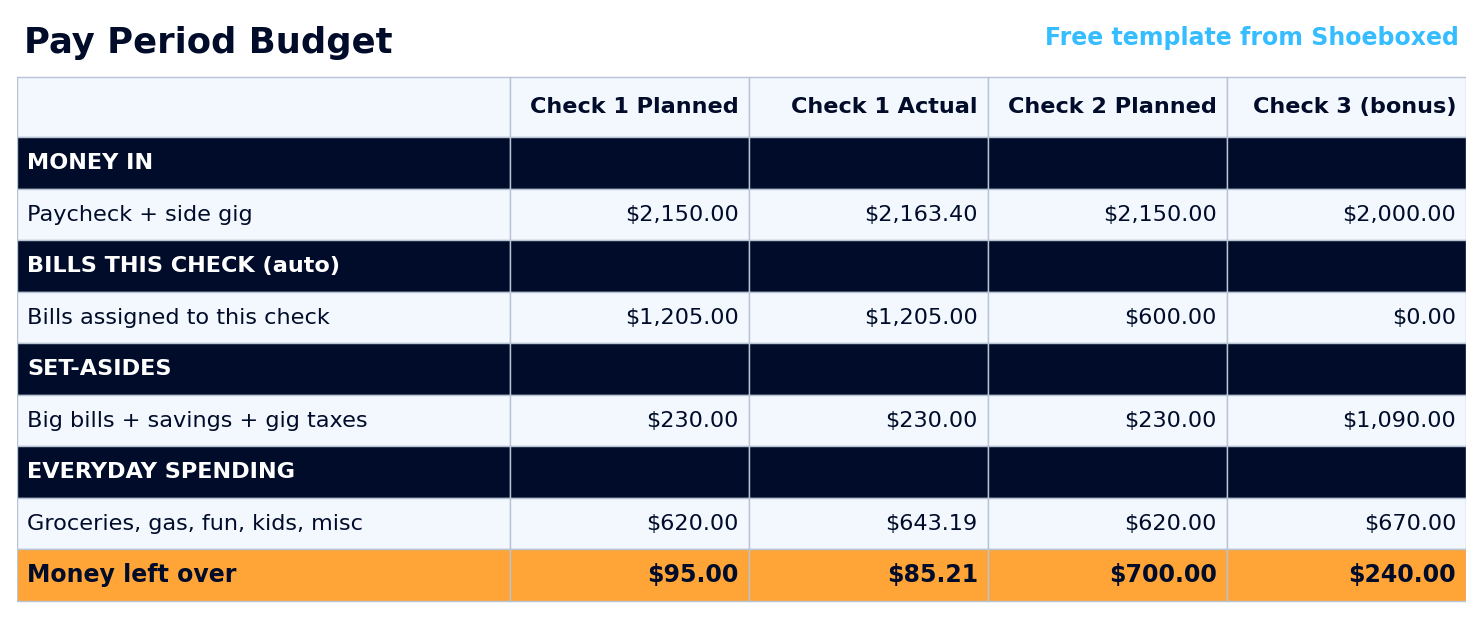 The Pay Period Budget tab gives each check a Planned and an Actual column, and the orange row at the bottom shows what's left.
How to set up your first pay period in 15 minutes
You only have to budget the next 14 days, and that one change does most of the work. Two weeks is short enough to picture. A month asks you to predict 30 days of life, but a pay period only asks for two weeks, and the next check gets its own fresh column anyway.
Setup runs in two steps, and you only do the first one once.
- Open the Bill Schedule tab. Type each bill's name, its amount, and its due day, then tap that bill's Paid from cell and pick the check that pays it.
- On payday, open the Pay Period Budget tab. Type your deposit in the Money in row, then fill in your set-asides and the spending plan for the next two weeks. The bills row fills itself from the Bill Schedule.
Say your check lands Friday at $2,150 including some side-gig money. Here is how that column works out in the template's sample month:
| Check 1 | Planned | Actual |
|---|---|---|
| Money in (paycheck + side gig) | $2,150.00 | $2,163.40 |
| Bills assigned to this check | $1,205.00 | $1,205.00 |
| Set-asides (big bills, savings, gig taxes) | $230.00 | $230.00 |
| Everyday spending (groceries, gas, fun) | $620.00 | $643.19 |
| Money left over | $95.00 | $85.21 |
Planned is what you meant to do, and Actual is what happened. This family planned to walk into the next payday with $95 and landed at $85.21. The everyday spending ran $23.19 over the plan, the side gig brought in $13.40 extra, and the column netted the two out without anyone doing math. That's $9.79 of drift on one check, which is easy to fix on the next one. Across 26 checks a year, the same leak runs about $250, and nobody notices a leak that slow without a column adding it up.
Which paycheck pays which bill
If the first half of every month feels broke, your bills probably aren't too big. They're bunched onto the wrong check. One person in that Reddit thread put it this way: after the mortgage comes out, "things are tight until the 15th."
The fix takes five minutes, and the Bill Schedule tab does the math. Look at each bill's due day, and if it lands before your second payday it goes on Check 1, while anything due after goes on Check 2. A bill too big for either check gets "Split" and takes half from each.
The fourth choice, "Save up," handles the bills that only show up a few times a year. Take car insurance that costs $1,080 every six months. That works out to $180 a month, so you type 180 in the Monthly amount column, then tap that bill's Paid from cell and pick Save up. Each check sets aside $90. When the $1,080 bill lands, the money is already sitting there.
Here is the template's sample month after sorting:
| Bill | Monthly | Due day | Paid from |
|---|---|---|---|
| Rent | $1,100 | 1 | Check 1 |
| Internet | $80 | 5 | Check 1 |
| Streaming | $25 | 8 | Check 1 |
| Electric | $110 | 18 | Check 2 |
| Phone | $70 | 20 | Check 2 |
| Car payment | $320 | 22 | Check 2 |
| Credit card minimum | $100 | 25 | Check 2 |
| Car insurance (twice a year) | $180 | Save up ($90 per check) | |
| Totals | $1,985 | Check 1 pays $1,205, Check 2 pays $600, and each saves $90 | |
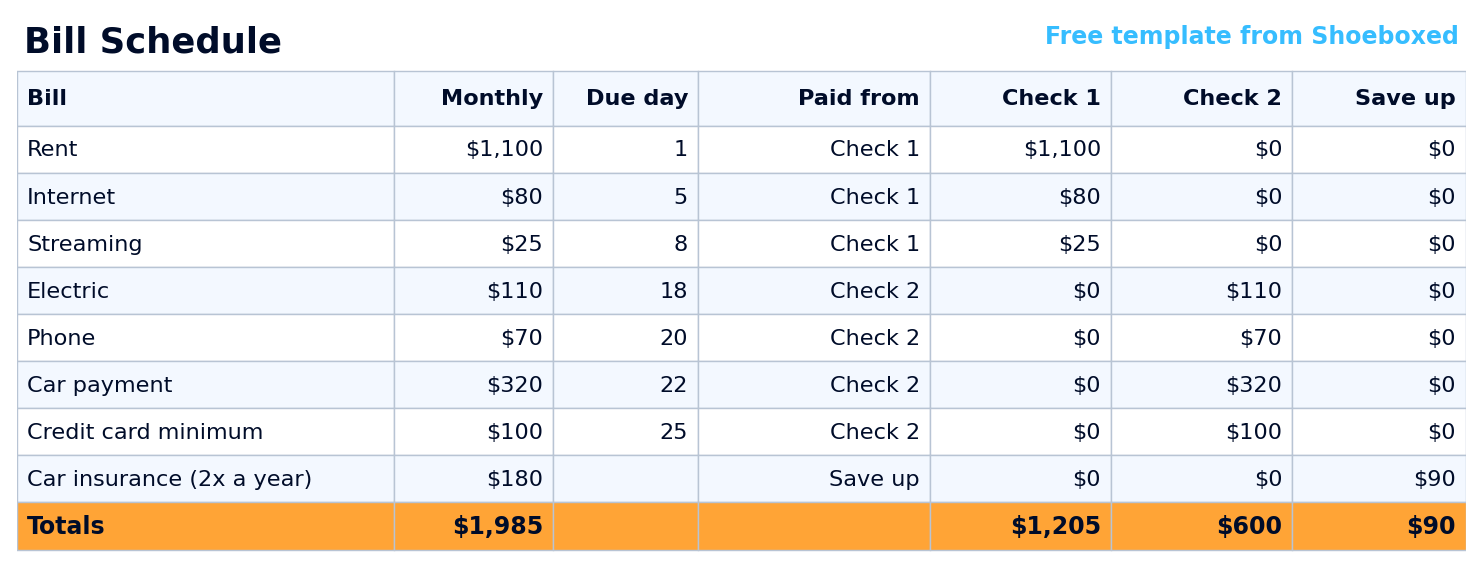 The same month inside the template's Bill Schedule tab. Pick a check from the dropdown and the per-check totals update themselves. The same month inside the template's Bill Schedule tab. Pick a check from the dropdown and the per-check totals update themselves. |
Notice the totals row. Check 1 carries $1,205 in due-dated bills while Check 2 carries $600, plus the $90 each one saves for insurance. That spread explains why the first half of the month feels broke and the second half feels rich. Sorting the bills exposes the spread, and then you can do one of two things about it.
- Split the big bill. In this sample the spread is one bill: the $1,100 rent due on the 1st. If your landlord takes half on each payday, tap the rent's Paid from cell and pick Split. Half the rent is $550, so Check 1's load drops from $1,205 to $655.
- Move a due date. Ask the internet or card company to shift a bill past mid-month. It costs nothing to ask, and most billers say yes.
On the same income, Check 2 walks into the next payday with about $700 left ($2,150 in, $600 of bills, and the same $230 of set-asides and $620 of spending). What if Check 1's bills add up to more than Check 1? You'll see that shortfall on the Bill Schedule tab before your bank shows it to you as an overdraft fee, and the same two moves apply. The longer-term fix is getting a month ahead, which we cover next.
Per-paycheck, pretend semi-monthly, or a month ahead: pick your strategy
There are three ways to budget on a biweekly paycheck. Two of them you can start today, while the third needs a full month of savings before it works at all. The same Reddit thread I mentioned earlier spends most of its comments arguing about these three, so here they are side by side.
| Strategy | How it works | Best for | The catch |
|---|---|---|---|
| Budget per paycheck | Each check gets its own two-week plan, and bills are assigned to the check that pays them | Starting today, with the money you already have | You make two small plans a month instead of one big one |
| Pretend semi-monthly | Budget on two checks a month and treat the two extra checks a year as pure savings | People who want a monthly rhythm anyway | Your due dates still float against your paydays, so tight weeks stay possible |
| Get a month ahead | Spend this month using last month's income, so the calendar stops mattering | Anyone with uneven income, or anyone willing to play the long game | You need a full month of income saved up before it works at all |
The template runs on the first strategy because it fixes the timing problem with the money already in your account. The Check 1 and Check 2 columns ARE the per-paycheck strategy, built into the sheet. And the other two still fit inside it. If you want to pretend semi-monthly, budget the two normal checks and send every Check 3 straight to savings. Getting a month ahead stays the long-term goal, and the people in that thread who made it talk about it like a finish line. Once you're there, fill each column from last month's income instead of Friday's deposit, and the template keeps working.
Third paycheck months: the two checks with no bills attached
You get 26 checks a year but only 12 months of bills. Twice a year the calendar hands you a paycheck with nothing assigned to it. Which two months depends on your payday schedule. Finding yours is quick: open your phone's calendar, add an event on your next payday, and set it to repeat every two weeks. Scroll the year, and the two months showing three payday events are yours.
Most people let that third check evaporate into the checking account, which is why I gave it its own column in the template. Check 3 has no bills attached, because the Bill Schedule already spread every bill across the first two checks. In the template's sample month, Check 3 lands at $2,000 with no side-gig money that week, and the family sends $1,000 of it straight to savings. They keep the usual $90 insurance set-aside, spend $670 on two weeks of life ($50 looser than the usual $620), and still have $240 left at the end. Between the $1,000 deposit and the $240 spare, that one check moves more into savings than most full months manage.
Plan those two checks on purpose, and a year or two of them can build the emergency cushion that makes a tight week survivable.
Why I put a Schedule C tab in a budget template
I put a Schedule C tab in a budget template because of what I see in our own data. Out of the 3,416,093 receipts that have come through Shoeboxed since January 2024, 38.1% arrive with no category at all. People keep the receipt and skip the label, and at tax time a receipt without a category usually goes unclaimed.
Side-gig money makes that worse, because it hides inside a household budget. The DoorDash gas goes in the gas budget, and the Etsy shipping comes out of the grocery run. In April there's no clean record that any of it was business. You pay tax on profit, not on what the apps deposited, so every business expense you can't show is profit you get taxed on anyway.
The Side Gig tab keeps that money in its own lane. Income goes on top and expenses sit below. Every expense gets a category from a dropdown that already knows its line on Schedule C, the form sole proprietors file with their tax return. Here is what three ordinary rows look like:
| Expense | Category | Schedule C line | Amount |
|---|---|---|---|
| Insulated delivery bags | Supplies & materials | Line 22 | $38.99 |
| Etsy listing and transaction fees | Platform & processing fees | Line 10 | $14.20 |
| Shipping two orders at USPS | Shipping & postage | Line 18 | $17.60 |
| Profit this month ($496.85 in, $70.79 out) | $426.06 |
The line numbers come from the most recent Schedule C the IRS has published. The categories are plain English instead of the form's exact wording, and the IRS renumbers a line now and then, so if your year's form looks different, your tax preparer will know where each total goes.
Two tax notes come with the tab. The IRS says "You have to file an income tax return if your net earnings from self-employment were $400 or more," and that $400 is profit, not deposits. Self-employment tax comes due on that profit too, which is why the budget tab carries a set-aside row for gig taxes. Put away 25-30% of profit from each payout to cover self-employment tax plus income tax. That way the bill is already funded when it arrives, whether that's in April or in the quarterly estimates the IRS asks for once a gig gets big. If the gig grows into a real business, our bigger accounting spreadsheet template picks up where this tab leaves off.
How a side gig cuts your tax bill: home office and mileage
The day a side gig becomes a real business, a spare room and a tank of gas start counting on your taxes. A W-2 paycheck never gave you that. The IRS says "Employees are not eligible to claim the home office deduction," but the deduction follows the business, and your side gig is one.
Here's the opportunity most people miss: the gig doesn't have to be big. Ten hours a month of 1099 work counts, as long as you run it like a real business. The home office rule asks for a space used regularly and only for the business, so a spare room where you pack Etsy orders and do the bookkeeping can qualify. The kitchen table can't, because the family eats there. IRS Publication 587 is the rulebook, and the template's Home Office Log tab runs the math for you.
Here's what that looks like on a real house. As I write this, a 1,315-square-foot house is listed for $199,900 near Peoria, Illinois (where I went to college), with $4,608 a year in property taxes and a $240-a-month HOA. Say you run the side gig from a 120-square-foot spare room in it. That room is 9.13% of the house, so 9.13% of every house bill becomes a business expense:
| House expense | Yearly cost | The office's 9.13% share |
|---|---|---|
| Property taxes (from the listing) | $4,608 | $421 |
| Mortgage interest (estimated, $180,000 loan) | $11,600 | $1,059 |
| HOA dues (from the listing, $240 a month) | $2,880 | $263 |
| Home insurance (estimated) | $1,500 | $137 |
| Utilities (estimated) | $2,400 | $219 |
| Repairs and maintenance (estimated) | $1,500 | $137 |
| Depreciation (estimated, ask your CPA) | $4,100 | $374 |
| Home office deduction | $28,588 | $2,610 |
Now read this part twice, because it's the best tax break most households with a W-2 job never use. The IRS has no minimum-hours rule for a home office. The only test is the one above: the room gets used regularly, and only for the business. Delivery driving, freelance bookkeeping, even small online contract work like Amazon's Mechanical Turk all count.
So say you pick up contractor work for ten hours a month at $25 an hour, and you run it from that spare room. Here is the whole deal:
| Ten hours a month at $25 an hour | Without the home office deduction | With it |
|---|---|---|
| You earn | $3,000 | $3,000 |
| The spare room takes off your taxable income | $0 | $2,610 |
| Income and self-employment tax you pay | about $1,000 | under $100 |
| You keep | about $2,000 | about $2,900 |
Same ten hours of work either way. The spare room is the difference between keeping about $2,000 of your new money and keeping about $2,900 of it.
One rule rides along with this, straight from IRS Publication 587:
"If your gross income from the business use of your home is less than your total business expenses, your deduction for certain expenses for the business use of your home is limited."
IRS Publication 587, "Deduction Limit"
In plain English: the deduction can't be bigger than what the gig earns in a year. A $3,000 gig clears the $2,610 with room to spare. Our free home office calculator runs your numbers in about a minute.
How you lose the deduction: using the room for anything personal. One family movie night in the home office and the whole room fails the exclusive-use test.
The car works the same way. The IRS lets you deduct 72.5 cents for every business mile you drive in 2026, and gig miles count: deliveries, supply runs, and the post office trips for orders you sold. The commute to your day job never counts, side gig or not. Say you put 25,000 miles a year on the car. Here is what the deduction looks like at three levels of gig driving:
| How much of the 25,000 miles is gig driving | Business miles | Deduction at 72.5 cents | Tax saved at a 22% rate |
|---|---|---|---|
| Evenings and weekends | 5,000 | $3,625 | $798 |
| Deliveries most days | 12,500 | $9,063 | $1,994 |
| Driving is the whole gig | 25,000 | $18,125 | $3,988 |
That last column is income tax only. A side gig pays self-employment tax on its profit too, and the deduction shrinks that as well. The template's Mileage Log multiplies the miles for you. When one tab stops being enough, our full mileage log template covers a whole year, and the current IRS mileage rate page stays updated when the rate changes.
Track the money coming in, not just the money going out
Back to the number that shaped this whole template. Only 1.6% of our 12,597 active accounts track income at all. That small group, about 200 accounts, used 214 different labels for it between them, from "Income" to "Ticket Sales," because nobody ever handed them a system and everyone invented their own. The template's answer is one page with both halves on it. Money in sits at the top of every column, money out below, and the side-gig tab keeps business income separate from the paycheck.
The receipts behind those expense lines are the part we handle. Snap a photo in the Shoeboxed app, forward an email, upload from your desktop, let the Gmail plugin grab them, or stuff a Magic Envelope and mail us the pile. Our team in Durham scans the paper, and our software pulls out the vendor, date, total, and category. We keep every receipt image for as long as you have an account. The budget plans the money, and we keep the proof.
When the receipt pile outgrows the spreadsheet, Shoeboxed takes it from there. We scan your receipts, read the vendor, date, and total off each one, and file them by category so your side-gig numbers are ready at tax time. See how it works.
Bi-weekly budget template FAQ
Is the template free, or is there a catch?
It is free, there is no email wall, and the download links at the top of this page open directly. Copy it to Google Drive or download the Excel file, and it's yours to keep.
What's the difference between a biweekly and a semi-monthly budget?
Biweekly means every other week, which works out to 26 checks a year. Semi-monthly means twice a month on fixed dates, which is 24. Those two extra checks are the whole reason this template exists, and they're why a generic monthly template never fits a biweekly paycheck.
Is this the same thing as a fortnightly budget template?
Yes. Fortnightly is the word for every-two-weeks pay in the UK, Australia, and New Zealand, and the budget tabs work the same in any currency. The two tax tabs follow US rules, so readers outside the US can ignore those.
How much should I save per paycheck?
Pick a fixed dollar amount per check instead of a monthly percentage. A per-check amount survives the months where the paydays land oddly. The sample month sets aside $230 per check: $100 to savings, $90 toward the twice-a-year insurance bill, and $40 for taxes on the side gig. The two third-paycheck months are where savings jump.
Does the template work in Google Sheets?
Yes. The Copy to Google Drive link at the top gives you the Sheets version with the same formulas and the same dropdowns. The Excel expense spreadsheet and Google Sheets expense tracker are the expense-side companions if you want deeper tracking. And if you like writing by hand, the printable expense tracker covers paper.
What if one paycheck's bills are bigger than the paycheck?
Sort the bills first, because the Bill Schedule tab usually shows the pile-up is fixable. Split the rent across both checks, move a due date or two, or turn a lumpy bill into a Save up row. If the math still doesn't fit, the bills are bigger than the income, and that's a money problem instead of a timing problem. The budget shows you which problem you have.
Grab the template, sort your bills onto the right checks once, and the next tight week will show up on a spreadsheet before it shows up in your bank account.
About the author. I'm Doug. I bought Shoeboxed in late 2025 with an SBA loan after fifteen years of running other people's companies as CEO. I'd used Shoeboxed myself back in 2010 at a previous gig and called it magical even then. I use it daily now. Small business owners deserve every dollar they're legally entitled to keep, which is why I bought Shoeboxed and work hard to make it better.
Sources
- IRS: 2026 standard mileage rate announcement
- IRS: Instructions for Schedule C (Form 1040)
- IRS: Publication 587 (business use of your home)
- IRS: home office deduction for small business owners
- IRS: Self-Employed Individuals Tax Center ($400 rule)
- Shoeboxed customer data: 3,416,093 receipts across 12,597 active accounts since January 2024; income-tracking analysis, May 2026
30 Seconds Could Save You Thousands on Taxes
Self-employed? Get an instant, personalized tax-savings estimate.




 4.4 / 5 on