Free 1099 Contractor Invoice Template (Excel & Google Sheets)
A free independent contractor invoice template that does the math and logs the income side. Built for 1099 work. Excel and Google Sheets, no email required.


My wife runs a small consulting business and gets paid as a 1099 contractor. She helps a few companies with project management and the work that never fits in a box. You know what does fit in a box? The invoice. It's the one piece of paper that says what she did and what she's owed, and getting it right is how she gets paid on time.
Here's a free invoice template I built for 1099 contractors like her. You fill in your hours and your rate, and the total adds itself up. Most templates online stop there, and that's fine for the front of the job. This one also keeps a running record of what you've been paid, which is the part almost nobody's template bothers with. I'll get to why that one habit matters more than the invoice itself.
Download the free contractor invoice template
Download the Excel file (.xlsx) →
Want it in the cloud instead? Copy it to your Google Drive. Tap the link, sign in to Google, and pick Make a copy. It opens in Google Sheets, Excel, or Numbers, and your numbers stay yours, since nothing you type lands in my copy.
You type in only the first two tabs. The rest are bonus tabs you'll be glad you have:
- Invoice. Your name, the client's name, an invoice number and date, then a line for each piece of work. You enter the hours and the rate, and the amount, the subtotal, the tax, and the total fill in by formula.
- Invoice Log. One row per invoice you send, so you can see what's paid and what's still owed at a glance. This is the income side, and it's the reason I built our own template instead of pointing you at someone else's.
- Read me first. A short how-to and a plain checklist of what a 1099 invoice has to include.
- Home Office Log and Mileage Log. The two deductions most 1099 filers leave on the table. One works out your home office write-off both ways the IRS allows, the other logs your business miles at the 2026 rate of 72.5 cents each. Both are yours even if you never send a single invoice.
- 25% off Shoeboxed. A code for a quarter off any plan, since you came this far.
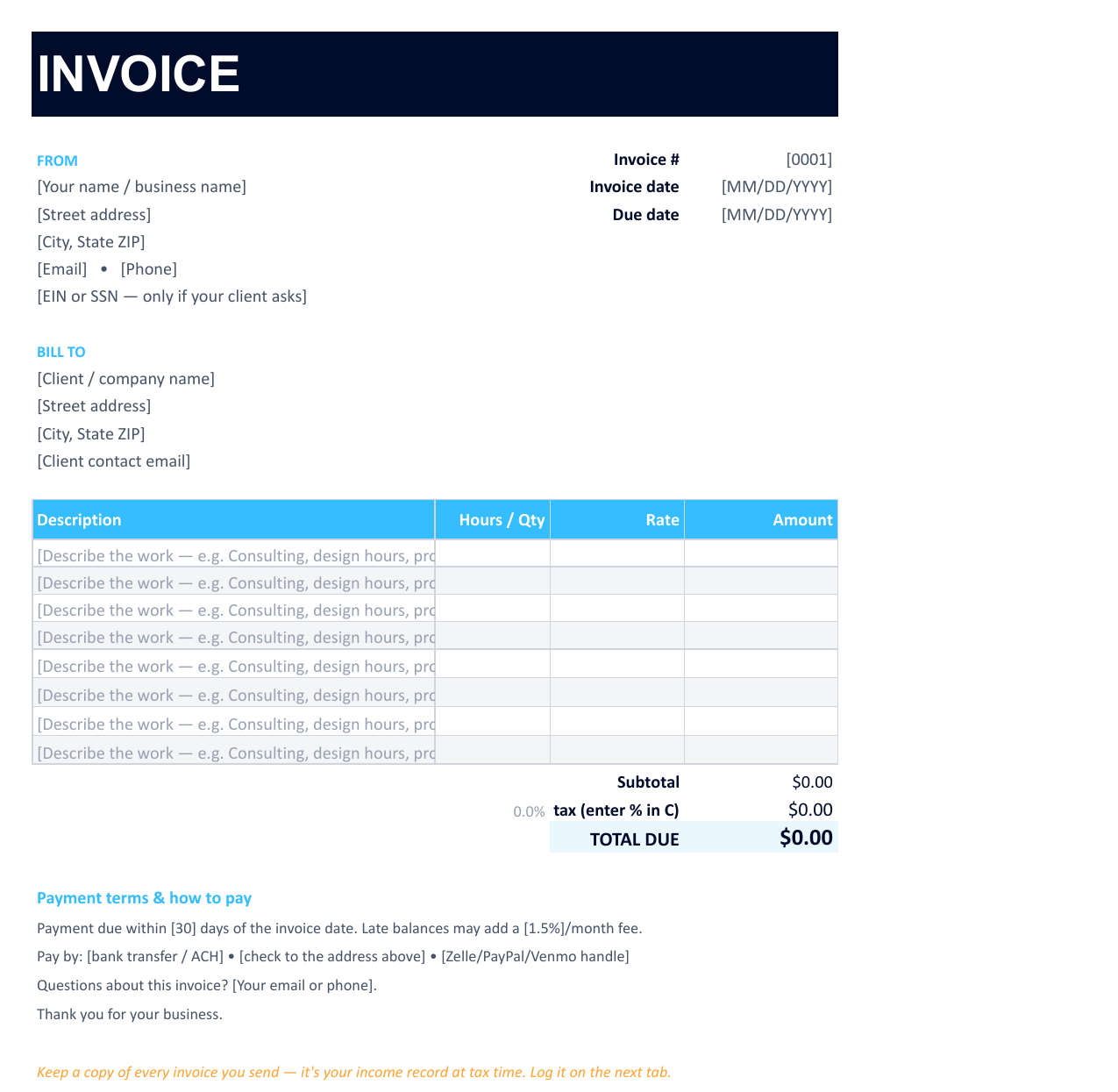 Here's the Invoice tab. You fill in the bracketed parts, and the amount, the subtotal, the tax, and the total fill in by formula.
If you only do one thing on this page, grab the template. Below, I'll walk through the rules baked into it, plus the one habit our own data says most 1099 folks skip.
What every independent contractor invoice needs
An invoice is a simple document, but a few pieces have to be there or it won't do its job. The template gives each one a labeled spot. Here's the whole list:
- The word "Invoice," a number, and a date. The number lets you and your client point at the same one later. Number them in order: 0001, 0002, and so on.
- Your business details. Your name or business name, address, email, and phone. You only add a tax ID (your EIN, or your Social Security number if you don't have an EIN) when a client asks for it, usually so they can send you a 1099-NEC. It doesn't belong on every invoice.
- Who you're billing: the client's name, company, and address.
- A line for each piece of work. What you did, the hours or quantity, your rate, and the amount. Spell the work out plainly. "Design work" invites questions, but "Homepage redesign, 3 rounds" does not.
- The total, the due date, and how to pay. One clear number, one clear date, and the ways you'll take payment.
One field you can usually leave alone: sales tax. Most service work isn't taxed, so keep the tax line at zero unless you sell physical goods or your state taxes services like yours. When in doubt, check your state's rule.
That's the whole list. A clean invoice leaves no room for "wait, what's this for?" The clearer your line items, the faster your client pays.
Hourly and flat-fee invoices use the same template
Two contractors can bill the same job two ways, and both are right.
Hourly. You put your hours in the quantity column and your rate in the rate column. Twelve hours at $90 an hour fills in as $1,080. This works well for open-ended work where the scope can move.
Flat fee. You agreed on one price for the whole job. Put 1 in the quantity column and the full fee in the rate column. The math comes out the same way, and the client sees one tidy number. This works well for defined projects with a clear finish line.
You can mix the two on one invoice. Bill a flat fee for the main project, then add a line or two of hourly for the extra requests that came in along the way.
Payment terms that get you paid
The invoices that get paid fastest are the ones that tell the client exactly when and how. Three lines do most of the work, and they're already in the template:
- When. "Payment due within 30 days." Net 30 is the common default, but shorter is fine if your client agreed to it. Spell out a late fee if you charge one.
- How. List the ways you'll take money: bank transfer, check, or an app like PayPal or Zelle. Let people pay the way they already pay, and you remove a reason to delay.
- Who to ask. A line that says "Questions? Email me here." A confused client is a slow-paying client.
Send the invoice the day the work is done, not at the end of the month. Every day you wait is a day later you get paid.
The half of the job almost nobody tracks
Here's the part I promised. We pulled the numbers on 24 consultants and independent contractors in our own customer data, across 21,048 receipts over two years. They're good at tracking expenses: every one of them logged travel, and 95.8% logged meals. But only 4 of those 24 tracked a single dollar of income.
That's backwards, and here's why it matters. When a client pays you enough for 1099 work, they file a copy with the IRS on a form called the 1099-NEC. For money paid in 2025 the form kicks in at $600, and for money paid after December 31, 2025, that rises to $2,000. Either way, the IRS gets its copy before you file. Nobody mails them a copy of your expense receipts. So the income side is the one most contractors ignore, and it's the exact side the IRS can already see.
When your reported income doesn't match what your clients told the IRS they paid you, you can get a CP2000 notice, the letter that says the numbers don't line up. The fix costs you nothing but a small habit: log every invoice as you send it. That's the whole reason the template has an Invoice Log tab. One row, ten seconds, and your income total sits there waiting in April instead of buried in your bank statements.
One thing in the data made me smile. Out of all the custom categories people type in, one contractor had named a category "INVOICED" and filed 945 receipts under it. They'd turned their whole income side into one bucket they could trust. That's the instinct the log tab is built around.
And report every dollar either way. Your Schedule C covers all of it, including the small jobs too tiny to trigger a form.
Where invoices meet receipts at tax time
Think of your taxes as two stacks. One stack is the money coming in, which is your invoices. The other is the money going out, which is your receipts for the things you can deduct. Put the two stacks together and you've filled out most of your Schedule C: income on top, expenses underneath, profit in the middle.
The invoice template handles the first stack. The second stack, the receipts, is the part we do for a living. Snap a photo of a receipt with the Shoeboxed app, forward an email receipt, or mail a pile in our prepaid Magic Envelope. Our software reads the vendor, date, and total, sorts each one into a tax category, and keeps the image for as long as you have an account. The IRS asks you to hang onto these records for at least three years, and a faded thermal receipt in a shoebox won't last that long. A scan will.
So the invoice gives you a clean income record, and a receipt scanner gives you a clean expense record. Keep both and tax time stops being a weekend you dread. If you want the spreadsheet version of the expense side, our free 1099 expense tracker maps every cost to its Schedule C line, and our guide to bookkeeping for independent contractors ties the whole routine together. If you hire help and need to pay them back for business costs, our free expense reimbursement form handles that side too.
The catch, since our own data already named it
The template is free and it's genuinely useful on its own. There's a catch, though, and the data above already named it: someone has to type. Every invoice into the log, every receipt into the tracker. The day that turns into a chore is the day the log goes blank and the records fall behind.
That's the job Shoeboxed does. You keep sending invoices with the free template, and we take the receipt side off your plate. You photograph, forward, or mail in your receipts, and we scan them, read them, and file them by category, so your expense records keep themselves. If the typing ever gets old, Shoeboxed Pro runs $29 a month with a 30-day money-back guarantee, and the bonus tab in your download takes 25% off any plan.


Frequently asked questions
Do I need an invoice from a 1099 contractor? Yes. If you pay a 1099 contractor for services or goods, ask for an invoice that shows their business name and contact info, what they provided, the date, and the total due. It's your proof of the expense, and it backs up the 1099-NEC you may have to file for them.
How do I write a self-employed invoice? Put the word "Invoice" at the top with a unique number and date, your name and contact info, who you're billing, a line for each piece of work with the hours or quantity and rate, the total due, the due date, and how to pay you. The free template on this page does all of that and adds up the total for you.
What's the difference between an hourly and a flat-rate invoice? On an hourly invoice you bill your hours times your rate. On a flat-rate invoice you bill one agreed price for the whole job. The same template handles both, and for a flat fee you put 1 in the quantity column and the fee in the rate column.
Do I have to report income if I never got a 1099? Yes. You report all of your self-employment income on Schedule C whether or not a client sends a 1099-NEC. A missing form doesn't make the income tax-free, and your invoices are how you prove the total.
About the author
I'm Doug. I bought Shoeboxed in late 2025 with an SBA loan and 5% down, so I run a small business and sweat the same tax bill you do. My wife consults on a 1099, which means the invoice template on this page gets tested at my own kitchen table. I write these guides because the surest way to grow Shoeboxed is to help people keep more of what they earn.
Sources
- IRS / Cornell Law, 26 U.S. Code §6041A (1099-NEC reporting threshold, $600 for 2025 and $2,000 after Dec. 31, 2025): https://www.law.cornell.edu/uscode/text/26/6041A
- IRS, Understanding Your CP2000 Notice: https://www.irs.gov/individuals/understanding-your-cp2000-notice
- IRS, Publication 583 (recordkeeping and how long to keep records): https://www.irs.gov/publications/p583
- Shoeboxed customer data, aggregate cohort of 24 consultant and contractor accounts across 21,048 receipts, 24 months ending June 2026.
30 Seconds Could Save You Thousands on Taxes
Self-employed? Get an instant, personalized tax-savings estimate.




 4.4 / 5 on