Tax Organizer Template (Excel + Google Sheets): Free 2026 Download
Download a free tax organizer template for Excel or Google Sheets. A printable prep checklist, an expense tab that maps every cost to its Schedule C line, plus home office and mileage logs. No email needed.


Updated June 2026.
A tax organizer is one place to gather everything you need before you file. That means the documents to collect, the income that came in, and the expenses that lower your tax bill. The free Excel and Google Sheets version here adds a printable prep checklist and an expense tab that fills in each cost's Schedule C line for you.
Copy the free tax organizer to your Google Drive → (tap "Make a copy" when Google asks, and it lands in your Drive)
Prefer Excel? Download the .xlsx file. You get six tabs: a printable prep checklist, an expense organizer that maps to Schedule C, a Schedule C summary for your accountant, a home office log, a mileage log, and a thank-you coupon. We don't ask for your email, and there's nothing to sign up for.
I own Shoeboxed, and since 2007 we've worked on one thing: the shoebox. You know the one. The bag, the drawer, the glovebox full of receipts a small business owner swears they'll sort out "before taxes." We've scanned 57 million of them for more than 552,000 small businesses, and every January the same thing happens. The receipts sit in a pile, the income hides somewhere, and nobody can find the one form the accountant keeps asking for. The work isn't hard. It's just scattered. And scattered costs people deductions Uncle Sam already set aside for them.
So I built this free tax organizer template to put it all in one place, and it opens in Excel or Google Sheets. The checklist tells you which documents to round up. The expense tab turns each receipt into its Schedule C line and deductible amount, and the totals come out ready for whoever files your return. Two bonus tabs catch the deductions small businesses miss most: the home office deduction and the business mileage deduction.
What's inside the free tax organizer template
The old version of this page sent you off to download three other people's organizers. This one is ours, and every tab does one job. Ignore any tab you don't need.
| Tab | What it does | Why it's there |
|---|---|---|
| Tax Prep Checklist | Lists every document and number to gather, grouped by type, with a Have it / Waiting status | The number one reason filing stalls is one missing form, and a checklist finds it in January instead of April |
| Expense Organizer | One row per receipt. Pick a category and it fills in the Schedule C line and the deductible amount | A categorized expense is a claimed expense, and the line number is what your accountant needs anyway |
| Schedule C Summary | Rolls up your totals by Schedule C line in one clean page | This is the page you hand to a tax preparer, already lined up with the form |
| Home Office Log | Figures the home office deduction both ways and checks whether your space qualifies | Most home-based owners either skip this or guess at it |
| Mileage Log | Four fields per trip, multiplied by the 2026 IRS rate for you | Every business mile takes 72.5 cents off your taxable income, but only if you wrote it down |
| BONUS coupon | 25% off Shoeboxed for 3 months, on any plan | A thank-you for downloading. The tab shows the code and how to redeem it |
Start with the printable checklist
Open the Tax Prep Checklist tab first (tap its name along the bottom of the sheet). It turns "I'll get to it" into a list you can finish. It names every document and number you round up before filing. The rows fall into four plain sections: your personal info, the money that came in, the money that went out, and personal deductions like mortgage interest or charity. Tap the Status cell on any row and pick Have it, Waiting, or N/A from the dropdown. A counter at the bottom of that tab tracks how close you are to done.
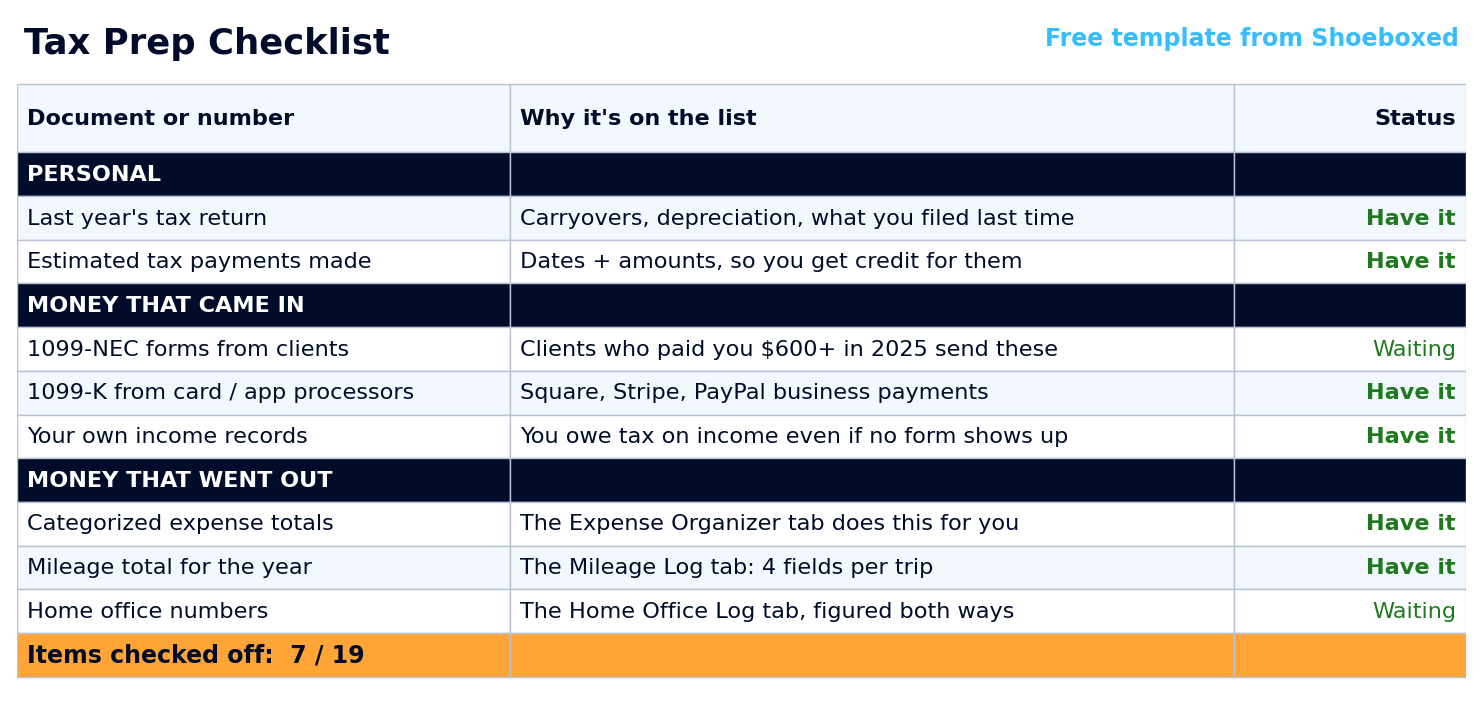 The Tax Prep Checklist tab. Work down the list, mark each item, and the counter at the bottom tracks what's left.
We made this tab print clean on one page, in case you like checking boxes by hand. A lot of folks come here looking for a printable tax organizer, and a checklist on the fridge in January beats one more file on your desktop. The printed page carries no sample data, so you get a blank list ready to fill in.
How the expense tab maps every cost to its Schedule C line
Here's the half most free organizers skip. Gathering your expenses is only half the job. The other half is knowing where each one goes on the tax form. That's where deductions go missing.
Open the Expense Organizer tab and the rest is one row at a time. You type one row per receipt and pick a category from the dropdown in the Category column. The sheet fills in two things for you: the Schedule C line that expense belongs on, and the deductible amount. For a business meal, it fills in half the cost, the 50% the IRS allows. A phone you use part-time for business takes whatever business percentage you enter (a rough guess like 60% is fine, and your preparer can refine it). Here's what a handful of rows look like:
| Expense | Category | Schedule C line | Deductible |
|---|---|---|---|
| Printer paper and folders | Supplies | Line 22 | $64.18 |
| Accounting software | Office expense & software | Line 18 | $35.00 |
| Annual license renewal | Taxes & licenses | Line 23 | $150.00 |
| Lunch with a referral partner ($41.60) | Meals (50%) | Line 24b | $20.80 |
| Phone bill ($88, 60% business) | Utilities & phone | Line 25 | $52.80 |
| Card processing fees | Bank & card fees | Line 27b | $73.42 |
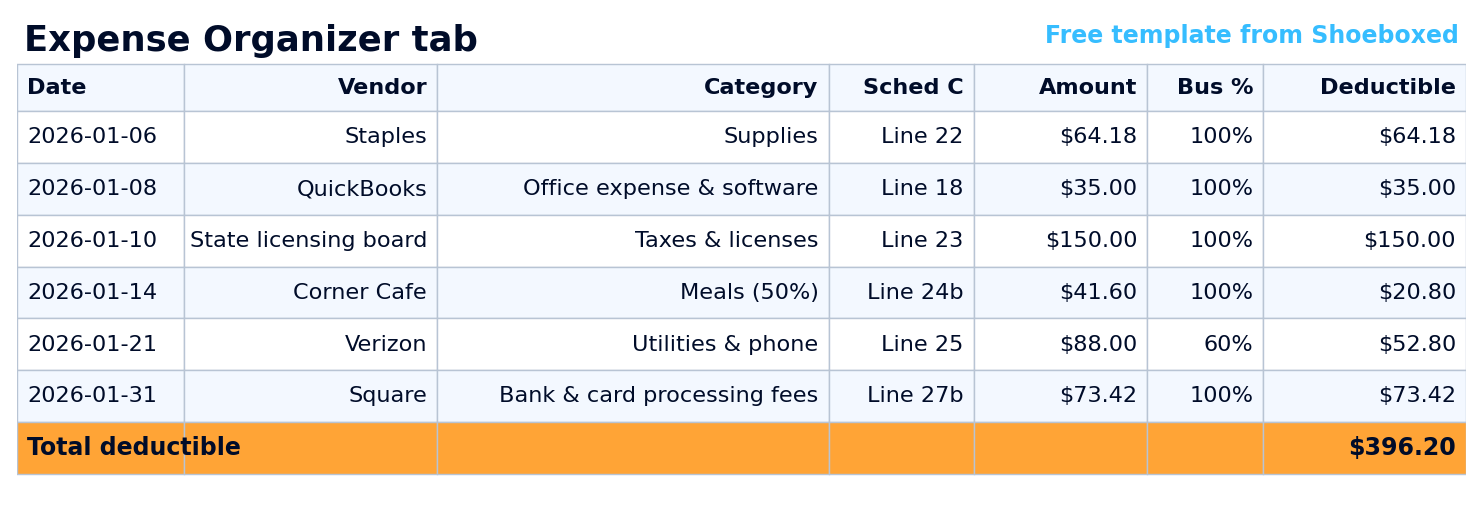 The Expense Organizer tab. Pick a category and the Schedule C line and deductible amount fill in on their own. The Expense Organizer tab. Pick a category and the Schedule C line and deductible amount fill in on their own. |
You never have to learn these line numbers; the sheet fills them in. They follow the most recent Schedule C, the form most self-employed people file with their return. The IRS shuffles a line now and then, and the template tracks the current ones for you. If your filing year's form looks different, your preparer will know where each total goes.
Every category total then rolls up on the Schedule C Summary tab. That's the page your accountant wants: your deductible expenses, sorted by line, in one view.
Two deductions the bonus tabs catch for you
If you run the business from home or drive for it, two deductions are sitting right there, and they're the two people skip most. The organizer comes with a tab for each.
The Home Office Log figures the deduction both ways. The simplified method gives you $5 per square foot up to 300 square feet, capped at $1,500, with no receipts needed. The actual-expense method adds up your office's share of the rent, utilities, and upkeep, with no cap. That one usually comes out bigger, and the tab figures both to show you which wins. One rule comes with it, straight from the IRS: you have to use the space "exclusively" and "on a regular basis" for the business.
How you lose the deduction: using the room for anything personal. One family movie night in the home office and the whole room fails the exclusive-use test. Keep it business-only and you're fine. If you want your real numbers in about a minute, our free home office calculator pulls your home's square footage from your address and runs the math.
The Mileage Log covers the car. The IRS lets you deduct 72.5 cents for every business mile in 2026: trips to clients, supply runs, bank deposits, the post office. The drive to a W-2 day job never counts. Four fields per trip is all the IRS asks for, and the tab multiplies the miles by the rate for you. When one tab isn't enough room, the current IRS mileage rate page stays updated whenever the rate changes.
How to build a tax organizer in Excel from scratch
You don't have to build a thing; the template above already does all of this. But if you like a weekend project, here's the short version of what goes into a tax organizer:
- Open a new workbook and give the first sheet columns for Date, Vendor, Description, Category, Amount, and a Deductible column.
- Add a category dropdown so every row gets a consistent label. On desktop Excel that's Data, then Data Validation, then a List. Consistent categories let you total each one later.
- Total each category with a SUMIF formula, so your supplies, your travel, and your meals each add themselves up.
- Map each category to its Schedule C line on a second sheet, so the totals come out in the order the tax form wants them.
- Add a checklist sheet for the documents you gather every year, so nothing gets forgotten between January and April.
That's the whole idea, and it's exactly what the free template already does, with the Schedule C lines and the 50% meals rule built in. Building it yourself is a good weekend project; downloading ours takes ten seconds.
Hand it to your accountant or tax preparer
A tax organizer pays off most at the handoff. If someone else files your return, send the Schedule C Summary tab. It's your totals, sorted by line, with the documents from your checklist attached. A preparer who gets that spends their time on your return, not on data entry. You spend less, since most of them bill by the hour.
If you keep books for clients yourself, the same template works as a client organizer. Copy it once per client. Each one comes back with categories and line numbers already in place.
When the receipt pile outgrows the spreadsheet, Shoeboxed takes it from there. Snap a photo in the app, forward an email, or ship us a stack in a prepaid Magic Envelope. Our team in Durham scans the paper, and our software pulls out the date, total, vendor, and category, so your tax organizer fills itself. See how it works.
Keep the receipts behind the totals
A tax organizer means little without the proof behind it. Keep a receipt for every number and an audit is no sweat. The IRS can look back three years on most returns, and a number with no receipt behind it is the first one an auditor flags. You can keep that proof in a shoebox, but a shoebox won't help you find the one receipt they ask about.
That's the part we handle. The totals in your organizer come from receipts, and Shoeboxed turns the paper pile into a searchable record. Snap a photo, forward an email, let the Gmail plugin grab them, or mail us a stack. Our team in Durham scans the paper, and our software reads the vendor, date, total, and category off each one. We keep every image for as long as you have an account. The organizer plans your taxes, and we keep the proof.
Tax organizer template FAQ
Is the template free, or is there a catch?
It's free, there's no email wall, and the download links at the top of this page open directly. Copy it to Google Drive or download the Excel file, and it's yours to keep.
Is there a printable version?
Yes. The Tax Prep Checklist tab is built to print clean on one page, with no sample data on it, so you get a blank list to fill in by hand. Print that tab and you have a paper tax organizer for the fridge.
Does it work in Google Sheets, or only Excel?
Both. The Copy to Google Drive link at the top opens the sheet and asks you to tap "Make a copy." Your own version then lands in your Google Drive with the same dropdowns and formulas. The Download .xlsx link saves the Excel file straight to your device. Pick whichever you already use.
What's the difference between a tax organizer and an expense tracker?
An expense tracker logs what you spend as you go. A tax organizer is wider: it gathers the documents, the income, AND the expenses, and lines them up against the tax form. This one does both, since the expense tab is built in. If you want a deeper expense-only tool, the business expense Excel template and the tax expense spreadsheet go further on tracking.
I'm a freelancer with 1099 income. Does this fit?
Yes. Schedule C is the form most freelancers and single-member LLCs file, and that's what the expense and summary tabs are built around. If your work is mostly 1099 contracting, the 1099 expense tracker spreadsheet is the version tuned for that, and the small business expense spreadsheet scales up if the business grows.
Can I give it to my accountant?
That's what the Schedule C Summary tab is for. It's your totals, sorted by Schedule C line, in one page a preparer can read at a glance. Send that, attach the documents from your checklist, and you've done the part that usually costs you billable hours.
Grab the organizer, fill in the checklist once, and next tax season is a handoff instead of a scramble.
About the author. I'm Doug. I bought Shoeboxed in late 2025 with an SBA loan after fifteen years of running other people's companies as CEO. I'd used Shoeboxed myself back in 2010 at a previous gig and called it magical even then. I use it daily now. Small business owners deserve every dollar they're legally entitled to keep, which is why I bought Shoeboxed and work hard to make it better.
Sources
30 Seconds Could Save You Thousands on Taxes
Self-employed? Get an instant, personalized tax-savings estimate.




 4.4 / 5 on