Monthly Bookkeeping Checklist: The 8 Tasks, in Order (Free PDF)
The free printable monthly bookkeeping checklist: the 8 tasks in order, with real data on what gets missed. No email required.


Updated June 2026
Monthly bookkeeping means 8 tasks: gather receipts, record income, categorize expenses, match the books to the bank statement, chase unpaid invoices, run payroll, set aside tax money, and close with a one-page profit-and-loss summary (a P &L). The list doubles as a tax strategy, because a categorized receipt is a deduction that gets claimed. The printable version below is free, no email required.
Imagine you're a designer wrapping up a busy month. Somewhere in your bag sits a wad of receipts you keep meaning to deal with. Or maybe you're a contractor whose "bookkeeping system" is a bank app and good intentions. You know the books need doing every month.
But what does "doing the books" mean, and what order do you do it in? This page answers both, and you can print the whole monthly bookkeeping checklist and stick it on the wall.
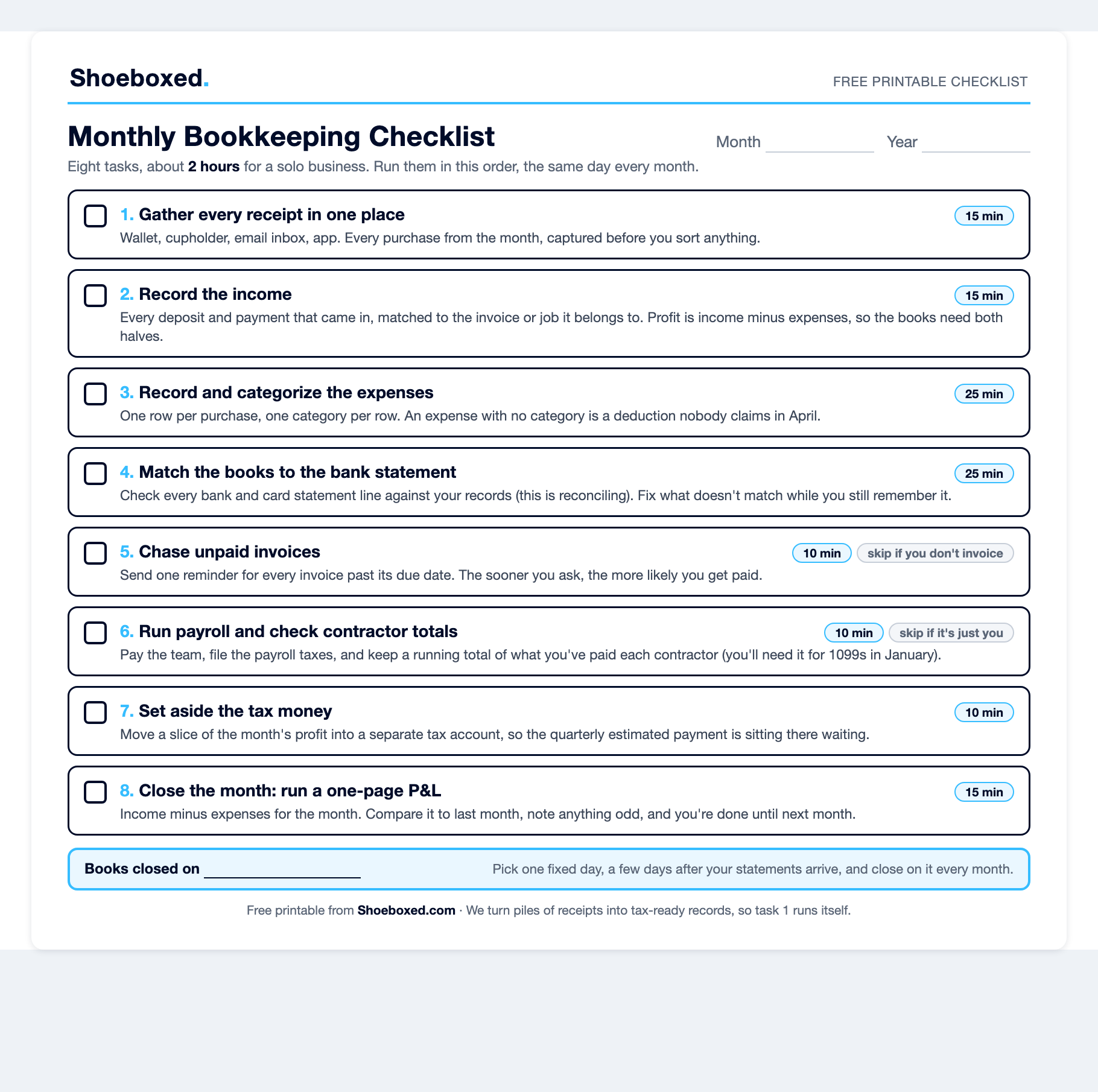 Download the free monthly bookkeeping checklist (PDF) → One page, 8 tasks, in order. No email, no signup, it's yours.
We've been scanning receipts since 2007, and that gives us a view nobody else has:
"Of 2,945,764 dated receipts our customers sent in since January 2024, only 41.6% arrived in the same calendar month as the purchase. The other 58.4% showed up after the month had already closed."
Shoeboxed customer data, June 2026
In other words, most monthly bookkeeping never happens in the month. Owners don't struggle with the list itself. They struggle to keep up with it month after month, and we'll get to the fix for that too.
The monthly bookkeeping checklist, in order
Here's the whole list. Do the tasks in this order: gather the records first, record them second, check them against the bank third, and only then trust the profit number at the end.
| Task | Time | What done looks like |
|---|---|---|
| 1. Gather every receipt in one place | 15 min | Every purchase from the month captured: paper, email, and app |
| 2. Record the income | 15 min | Every deposit matched to the invoice or job it came from |
| 3. Record and categorize the expenses | 25 min | One row per purchase, one category per row, no blanks |
| 4. Match the books to the bank statement | 25 min | Every statement line accounted for (this is reconciling) |
| 5. Chase unpaid invoices | 10 min | One reminder sent per overdue invoice. Skip if you don't invoice |
| 6. Run payroll and check contractor totals | 10 min | Team paid, contractor pay totals current. Skip if it's just you |
| 7. Set aside the tax money | 10 min | A slice of the month's profit moved to a tax account |
| 8. Close the month with a one-page P &L | 15 min | Income minus expenses, compared to last month |
| The 8 monthly bookkeeping tasks. Tasks 5 and 6 disappear if you don't invoice or employ anyone. |
If you run a one-person business with no invoices and no employees, your real list is six tasks. Most bookkeeping checklists you'll find online were built for accounting firms with a whole team behind them. You're allowed to skip what doesn't apply to you.
4 benefits of keeping your books current
- A lower tax bill. Every category maps to a Schedule C line, so you claim the deduction instead of forgetting it. 38.5% of the receipts we see arrive with no category, and that's money left on the table in April.
- A real profit number, not a bank balance. The bank app shows the cash you're holding, not what you earned, because next month's card bill and tax money are hiding in that balance. Books that record both the money in and the money out show what you earned.
- A quarterly estimate you can defend. Task 7 sets the tax money aside, and a current P&L tells you how much to set.
- Errors caught while you still remember them. Matching the books to the statement every month surfaces a double charge or a missing deposit in days, not at year-end.
A tax podcast I like, the Small Business Tax Savings Podcast, puts the first point plainly: most owners treat bookkeeping as something to clean up at tax time, and if the books are wrong, the tax plan works from the wrong numbers. That's their whole pitch, and they're right: clean books all year are the tax strategy.
How to run each task, step by step
1. Gather every receipt in one place
Picture last month's receipts: the paper slip in the cupholder, the crumpled one in your wallet, the email ones buried under promotions. Task one is getting all of them into one pile before you sort anything. IRS Publication 583 lists what counts as a supporting document: receipts, invoices, canceled checks, account statements, and credit card slips. For most filers, the IRS stops looking back three years after you file, so the records need to outlive the year.
Paper doesn't last that long. Thermal receipts fade, and the National Archives of Australia warns the image can disappear entirely within five years. The do-it-yourself version of this task is one folder for paper, one email label for the digital ones, and a phone album for photos. That works. We built Shoeboxed to do it for you, and receipts reach us five ways. Snap a photo in the app, upload from your desktop, forward the email ones, let the Gmail plugin find them, or mail the pile in a Magic Envelope (a postage-paid envelope we send you). Our team in Durham scans the paper, and the software pulls out the vendor, date, and total. We store the actual receipt image for as long as you have an account. By the time you sit down to do the books, task one is already done.
2. Record the income
Almost nobody records the money coming in. We looked at 3,017 Shoeboxed customers who each scanned 100 or more receipts, and only 108 of them, about 4 in 100, ever recorded a dollar of income with us. The rest kept careful track of what they spent and nothing else. Your tax return ends with one number, Schedule C line 31: net profit, which is income minus expenses. Books that only track spending are half a ledger, and half a ledger can't produce that number. So open your books (the free spreadsheet linked in task 8 works, or whatever software you already use) and record every deposit that came in this month, matched to the invoice or job it belongs to.
3. Record and categorize the expenses
Give each purchase one row and each row one category. The category turns a pile of spending into deductions, because every category maps to a line on Schedule C. Our customers prove how often owners skip this step: 38.5% of the receipts they sent in since January 2024 arrived with no category. An expense with no category is a deduction nobody claims in April.
Keep your category list short and boring. Schedule C has about two dozen expense lines, and our customers have invented 186,981 category labels trying to feed it. Shoeboxed plug: our software suggests the category when it reads each receipt, so this 25-minute task shrinks to a review pass.
4. Match the books to the bank statement
Open the month's bank and card statements and check every line against your records (bookkeepers call this reconciling). You're looking for two kinds of surprises: money that left your account with no record in your books, and records in your books the bank never saw. Fix the mismatches now, while you can still remember what that $43 charge was. Wait six months and you'll be guessing.
5. Chase unpaid invoices
Send one reminder for every invoice past its due date. Ask early and you're more likely to get paid, because a polite nudge in the current month lands better than a desperate one at tax time. If you don't send invoices, cross this one off and enjoy the head start.
6. Run payroll and check contractor totals
If it's just you, skip ahead. If you have a team, pay them and file the payroll taxes on schedule. For contractors, keep a running total of what you've paid each one, and collect a Form W-9 up front. Starting with payments made in 2026, the IRS requires you to send a Form 1099-NEC to any contractor you pay $2,000 or more in a year, with a copy to the IRS, by January 31. That threshold sat at $600 for decades, and the 2025 tax law raised it. Keep the running totals current and January gets easy.
7. Set aside the tax money
Nobody withholds taxes for you when you're self-employed. Move about a quarter of this month's profit into a separate savings account now (profit was $4,000? move $1,000), and your tax preparer can tighten that number later. The quarterly estimated payment then sits there waiting instead of ambushing you. Those payments come due April 15, June 15, September 15, and January 15. A current P&L turns the quarterly estimate into a calculation instead of a guess.
8. Close the month with a one-page P&L
Run a simple profit and loss for the month: income minus expenses, next to last month's numbers. Read it for one minute and note anything odd, like a category that doubled or income that dipped. While you're here, add this month's business miles to your mileage log (the IRS lets you deduct 72.5 cents a mile for 2026 business driving), and write your home office numbers down somewhere your tax preparer will find them. If you keep your books in a spreadsheet, our free Google Sheets accounting template builds this P&L for you. That's the close. You're done until next month.
Most monthly bookkeeping doesn't happen in the month
We pulled every dated receipt our customers sent in since January 2024, all 2,945,764 of them, and measured the days between the purchase date and the day the receipt reached us. No other checklist can show you this chart.
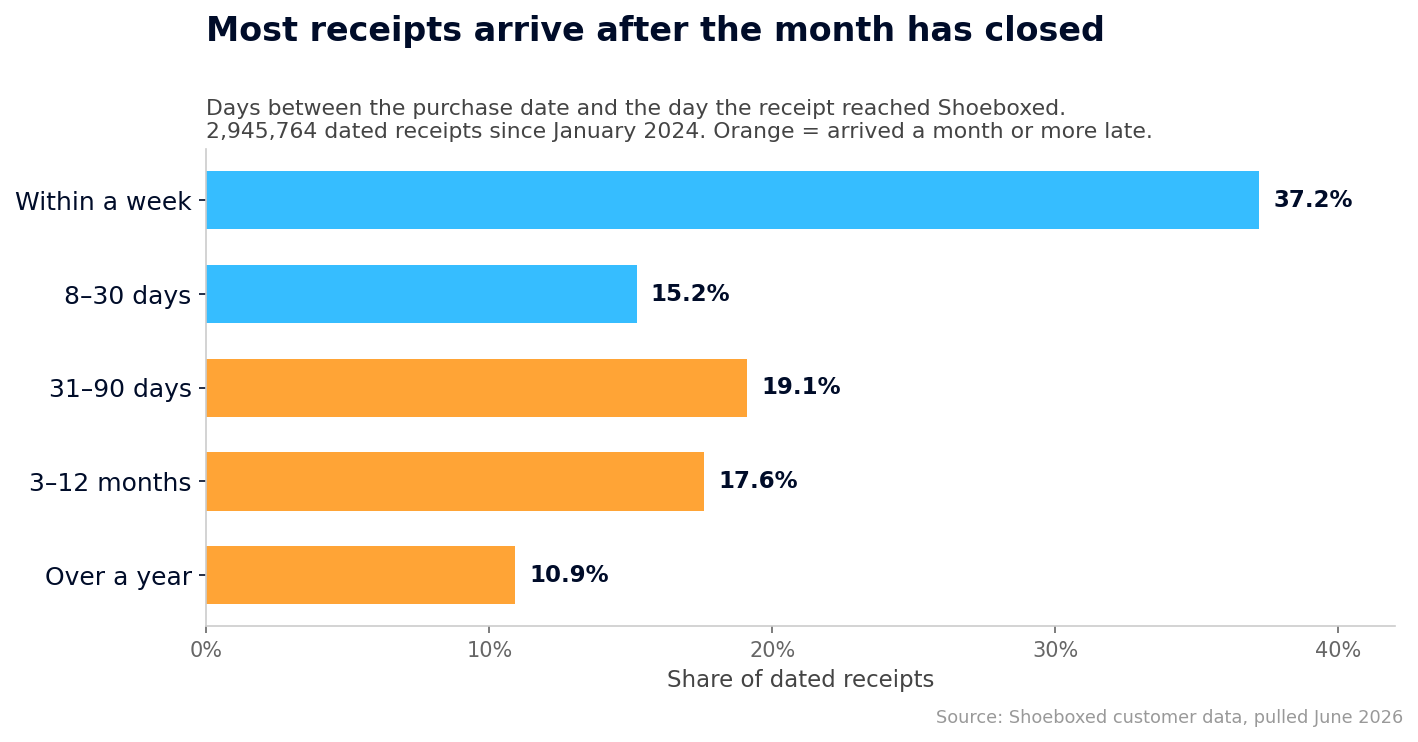 How long receipts take to arrive, across 2.9 million dated receipts since January 2024. 47.6% arrived a month or more after the purchase.
Only 41.6% arrived in the same calendar month as the purchase. (The chart and that number don't measure the same thing. The chart counts days between purchase and arrival. The 41.6% measures something stricter: did the receipt arrive before the month ended? Buy something on the 28th, and even a five-day lag misses the cutoff.) And 10.9% arrived more than a year late, which means the month they belonged to had closed, and so had the tax year. To be fair to our customers, Magic Envelope users create some of that lag on purpose: they save up a pile of receipts and mail the whole thing in at once. Even so, among people who pay for a receipt service, the month usually closes before the records show up.
The pattern gets worse at tax time. Of the receipts our customers send in between January and April, 36.4% carry a date from the previous calendar year. That number measures the April scramble, when owners cram a year of bookkeeping into the weeks before the deadline. I used to live in that 36.4%, and I told the whole embarrassing story in our guide to the types of bookkeeping. The short version is that my CPA charged extra every spring to untangle what I handed him.
So a monthly bookkeeping checklist only works if it's short enough to run every month. Other checklists list the same eight tasks. Ours fits on one page and starts with the one task you can make automatic.
What day to close your books, and what to hand your tax preparer
Pick one fixed day and close on it every month. Close a few days after your bank and card statements arrive, because task 4 needs the statement to check against. For me that's the 10th.
Here's why the statement comes first. A typical one-person business counts income when it arrives and expenses when it's paid out (the cash method, the box you check on Schedule C line F). IRS Publication 538 spells that out. The bank statement shows when the money moved, so your books and the statement should tell the same story.
Close all twelve months and January is painless. Hand your tax preparer this folder and watch their face:
- The year's profit and loss, which is your twelve monthly P&Ls added up.
- Category totals that map straight onto the Schedule C expense lines.
- Your mileage log and your home office numbers (square footage and expenses).
- The contractor list, with W-9s and the running payment totals for each one.
- And the receipt file backing all of it.
The monthly close covers the back half of the bookkeeping cycle, and our plain-English walkthrough of the accounting cycle shows where these tasks come from. If you're still deciding how to keep books at all, start with the types of bookkeeping. Independent contractors get their own bookkeeping guide too.
Three months behind? Here's the catch-up path
If your books are three months behind, you have plenty of company, and our data proves it: more than a third of the receipts we see in tax season carry last year's dates. Nobody's grading you. Here's the way out:
- Pull every bank and card statement for the gap, because the statements form the skeleton of the months you're rebuilding.
- Capture every receipt in one batch before you sort anything. Get the paper and the email ones into one place (or into a Magic Envelope, and we'll do the rest), because whoever does the sorting needs something real to work from.
- Work one month at a time, oldest first, running the same 8 tasks on each one. A finished March beats a half-done quarter.
- Don't try to make the old months perfect. You're filling in the same two dozen Schedule C lines you use all year, so close enough and categorized beats perfect and abandoned.
When you're caught up, set the fixed close day from the last section so the gap never reopens. The whole point of the monthly rhythm is that no single month is ever a big job.
Make the receipt step automatic
Here's what 2.9 million receipts told us: owners don't fail at bookkeeping because the tasks are hard. The recording is a chore, paid work always wins, and most of each month's paper arrives after the month has closed. So make the chore automatic. Send Shoeboxed your receipts however they show up, and we turn them into an organized, categorized, tax-ready record while you run your business.
Shoeboxed starts at $9 a month, and web signup carries a 30-day money-back guarantee: try it for a month, and if it isn't for you, we refund the money. Start a Shoeboxed account → The mobile app comes with a 7-day free trial, no payment required up front:


Print the checklist, pick your close day, and keep more of what you earn. That's the whole system.
Frequently asked questions
How long does monthly bookkeeping take?
Plan on about 2 hours for a solo business. Our checklist budgets 15 minutes for gathering receipts, 15 for recording income, 25 for categorizing expenses, and 25 for matching the books to the bank statement. The rest goes to invoices, tax savings, and the closing P&L. Skip the invoice and payroll tasks if they don't apply, and you'll finish well under two hours.
What are the three golden rules of bookkeeping?
Accounting courses teach three traditional rules for double-entry books: debit the receiver and credit the giver, debit what comes in and credit what goes out, and debit expenses and losses while crediting income and gains. For a cash-basis Schedule C filer, the working translation runs simpler: record every dollar in, record every dollar out, and make the books agree with the bank.
What is a bookkeeper not allowed to do?
A bookkeeper who isn't a CPA, an enrolled agent (a tax specialist the IRS licenses directly), or an attorney can't fully represent you before the IRS. The IRS's credential rules reserve unlimited representation rights for those three groups. At most, a bookkeeper who completed the IRS's Annual Filing Season Program can speak for you on returns they prepared and signed, and even then not in appeals or collection cases. Anyone paid to prepare your federal return must also hold a PTIN (a preparer ID number the IRS issues). The short version: a bookkeeper keeps the records, and they don't argue your case with the tax man.
Is AI replacing bookkeepers?
Software keeps absorbing the data entry, and the Bureau of Labor Statistics projects 6% fewer bookkeeping-clerk jobs by 2034, alongside about 170,000 openings a year as people retire. The judgment work stays human. We dug into the certifications, pay, and career path in the types of bookkeeping guide.
About the author
I'm Doug. I bought Shoeboxed in late 2025 with a Small Business Administration loan and 5% down, so I run a small business and sweat the same tax bill you do. For years I did my own books once a year, badly, in April. This checklist is the system I wish I'd printed a decade ago. Helping you keep more of your hard-earned money is the whole point.
Sources
- IRS Publication 583: Starting a Business and Keeping Records
- IRS: How long should I keep records?
- IRS Publication 538: Accounting Periods and Methods
- IRS Schedule C Instructions
- IRS Form 1040-ES: Estimated Tax for Individuals
- IRS: About Form 1099-NEC and IRS: One Big Beautiful Bill business tax provisions
- IRS: 2026 standard business mileage rate
- IRS: Understanding tax return preparer credentials and qualifications
- BLS Occupational Outlook Handbook: Bookkeeping, Accounting, and Auditing Clerks
- National Archives of Australia: Managing records on thermal papers
30 Seconds Could Save You Thousands on Taxes
Self-employed? Get an instant, personalized tax-savings estimate.




 4.4 / 5 on