The Accounting Cycle Explained: 5 Simple Steps
The accounting cycle in 5 plain-English steps, with real data from 1.1 million receipts showing where small-business books fall behind.


Updated June 2026
The accounting cycle is the repeating process that turns a pile of purchases and sales into financial statements. It runs in five steps: record every transaction, enter each one in a journal, sort the entries into accounts, check that the totals balance, and produce the reports. Software now runs the mechanics of the middle steps. Your real jobs are capturing transactions, filling in categories, and checking once a month that the books match the bank.
Imagine it's the second week of April. You're at the kitchen table with a shoebox of receipts and twelve bank statements, trying to rebuild a year of your business in one weekend. Or maybe you're newer to this, and your CPA keeps using words like "ledger" and "trial balance" as if everyone learned them in school. Both versions of that story cost real money, because every receipt that never makes it into your books is a tax deduction nobody claims. Keep reading for all five steps in order.
I'm Doug, and I own Shoeboxed. Since 2007 this company has scanned more than 57 million receipts for over 552,000 customers, so we can measure how long a receipt waits in real life before it reaches anyone's books. I pulled twelve months of that data for this article.
"Of the 1.12 million receipts with readable purchase dates that Shoeboxed customers sent in over the last 12 months, the typical receipt waited three weeks between the purchase and the books. One receipt in four waited three months or longer."
Shoeboxed customer data, June 2026
The accounting cycle exists to close that gap. So here's the whole thing in plain English, sized for a small business instead of an accounting classroom.
The accounting cycle in 30 seconds
The cycle is a loop. It starts when money moves, it ends when the period's reports come out, and then it starts over for the next period, usually a month.
- Record every transaction. Capture the receipt, sale, or bill while you still have it.
- Enter each one in the journal. One dated line per transaction, in the order they happened.
- Sort the entries into accounts in the ledger. The ledger works like a filing cabinet, where meals go in one drawer and supplies go in another.
- Check that the totals balance. Match your books against your bank statement and fix what disagrees.
- Produce the reports and close the books. The profit-and-loss statement and balance sheet come out, the period locks, and the loop restarts.
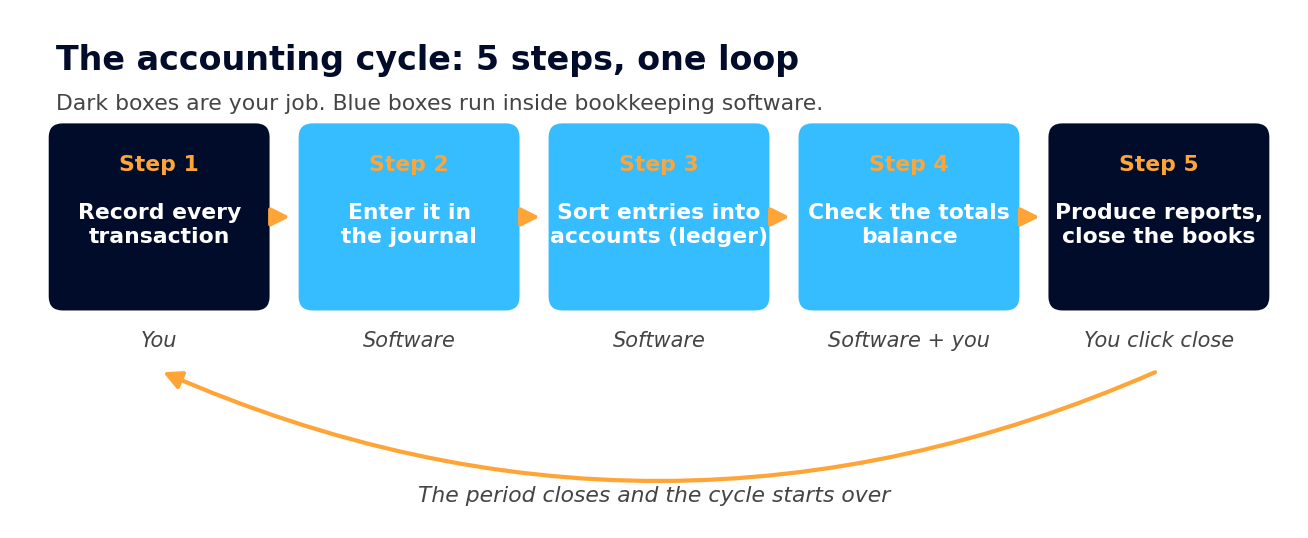 The 5-step accounting cycle. Dark boxes are the owner's job, and blue boxes run inside bookkeeping software.
The verdict for a one-person business: you do step 1, software runs the mechanics of steps 2 through 4, and a monthly half hour covers the rest. Bookkeeping software like QuickBooks, Xero, or Wave writes the journal, posts the ledger, and balances the totals the moment a transaction lands. What it can't do is record a receipt it never saw, pick the right category, or confirm the books match the bank. That's why the rest of this article focuses on the jobs you still control: capturing transactions and keeping a monthly rhythm.
Maybe you're also wondering whether to keep the books yourself or hire someone, and how detailed your records need to be. Those questions have their own guide, the types of bookkeeping. This article stays on the cycle itself.
The 5 steps of the accounting cycle
Step 1: Record every transaction
A transaction is any time money moves. A customer pays you, or you buy printer ink. The cycle starts by capturing each one along with its proof. The IRS lists what counts as proof in Publication 583:
"Supporting documents include sales slips, paid bills, invoices, receipts, deposit slips, and canceled checks."
No software can do this step for you. Our data says it's also where books fall apart. A receipt that sits in a coat pocket for three months may never reach step 2 at all. By April, the faded ones and the lost ones turn into deductions you can't claim.
Capturing receipts is the job Shoeboxed does, and you get five ways to send one in. You can snap a photo in the app, upload from your computer, forward the ones that arrive by email, let us find the receipts in your Gmail automatically, or stuff the paper pile into a Magic Envelope, the prepaid mailer we send you. Our team in Durham scans the paper, and our software pulls out the vendor, date, and total, which are the fields the IRS wants. We keep every receipt image for as long as you have an account, and you can export it all whenever you like.
One warning from our data before we move on. Spending is only half the record, and the half that goes missing is income. When we checked 3,017 active accounts that had each scanned 100 or more receipts, only 108 had ever recorded a dollar of income. The rest kept half a ledger, with careful records of spending and no record of what they earned. Our free income and expense worksheet gives both halves a home.
Step 2: Enter each transaction in the journal
The journal is a list of every transaction in date order, the diary of your business. A bookkeeper used to write that list by hand. Today the software writes it the moment a purchase shows up from your connected bank account or a receipt comes in. You'll never open the journal unless something needs a second look.
Your one decision at this step is when a transaction counts. The IRS gives small businesses the easy answer in Publication 538:
"Under the cash method, you generally report income in the tax year you receive it, and deduct expenses in the tax year in which you pay the expenses."
In other words, count the money when it moves. That's the cash method, and it's what most one-person businesses use. Our types of bookkeeping guide covers the Schedule C checkbox where you tell the IRS your choice.
Step 3: Sort the entries into accounts in the ledger
The journal lists transactions by date. The ledger sorts those same transactions by account, which is the bookkeeping word for category. Advertising goes in one bucket and meals in another, and those sorted buckets are what make books usable. How much did you spend on supplies this year? With a ledger, that's a number you look up instead of a pile you re-read.
Software posts each entry to the ledger on its own. Your part is making sure each transaction carries a category the tax form can use. This is the second place our data shows books leaking. Since January 2024, 38.1% of the 3.4 million receipts our customers sent in arrived with no category at all. An expense with no category never makes it onto the tax form. If you want category names that map straight to the tax form, our free Google Sheets accounting template ties every category to its Schedule C line.
Step 4: Check that the totals balance
The textbook calls this step the trial balance: add up both sides of every account and confirm the totals agree. When a bookkeeper kept the books by hand, this step caught the $350 that went into the ledger as $530. Software now runs that math on every entry, so the modern version of step 4 is reconciling. That means matching your books against your bank statement, line by line, until the two agree.
Reconciling catches the things software can't. The duplicate charge, the personal purchase on the business card, and the customer payment that never arrived all show up here. A month of transactions reconciles over one cup of coffee. Twelve months of them swallow the weekend you'd planned to spend on something else.
Step 5: Produce the reports and close the books
This step is the payoff, where the software turns your balanced accounts into two reports. The profit-and-loss statement shows what you earned and spent over the period, and the balance sheet shows what the business owns and owes on the closing date. For a sole proprietor, the profit-and-loss is the one that matters. Your whole tax return funnels into one number on Schedule C line 31: your net profit.
Closing the books means locking the finished period so its numbers can't change after the fact, then starting the loop again for the new one. Close each month and April becomes a review instead of a rebuild.
Why the textbook lists 8 steps and you only need 5
You may have seen guides that teach an 8-step accounting cycle, and they're not wrong. They're describing the same loop with the hand-bookkeeping mechanics spelled out. Paper ledgers needed worksheets and extra balance checks, so the textbook lists each one as its own step. Software turned those middle steps into math that runs on every entry, which folds the textbook's eight steps into the five above.
| The 8 textbook steps | Where it lives in the 5 steps | Who does it today |
|---|---|---|
| 1. Identify transactions | Step 1: record every transaction | You , with capture tools like Shoeboxed |
| 2. Record them in a journal | Step 2: enter them in the journal | Software |
| 3. Post to the general ledger | Step 3: sort entries into accounts | Software, with your categories |
| 4. Unadjusted trial balance | Step 4: check that the totals balance | Software |
| 5. Analyze the worksheet | Step 4 again | Software flags it, you review |
| 6. Adjusting journal entries | Step 4 again | You or your CPA, at year end |
| 7. Create financial statements | Step 5: produce reports and close | Software |
| 8. Close the books | Step 5 again | You, in your software's close-the-books setting |
| The 8-step textbook cycle and the 5-step owner's cycle describe the same loop. The difference is that software absorbed the bookkeeping mechanics in the middle. |
If you're an accounting student, learn all eight, because your professor's exam still runs by hand. If you run a business, the five-step version is the honest description of the work left on your desk.
How often to run the cycle, and what 1.1 million receipts say
The textbook says the cycle runs once per accounting period, and it leaves the period up to you. Our data shows which period small businesses pick when nobody decides on purpose: tax season.
Between New Year's Day and Tax Day this year, our customers sent in 361,402 receipts with readable dates, and 46.5% of them carried a purchase date from the year before or earlier. That's the accounting cycle running once a year, in one painful April sitting. I say that with sympathy, because I used to run my own little LLC's books the same way: a year of bank statements in the last week before the deadline, something always wrong, and my CPA charging extra to untangle it.
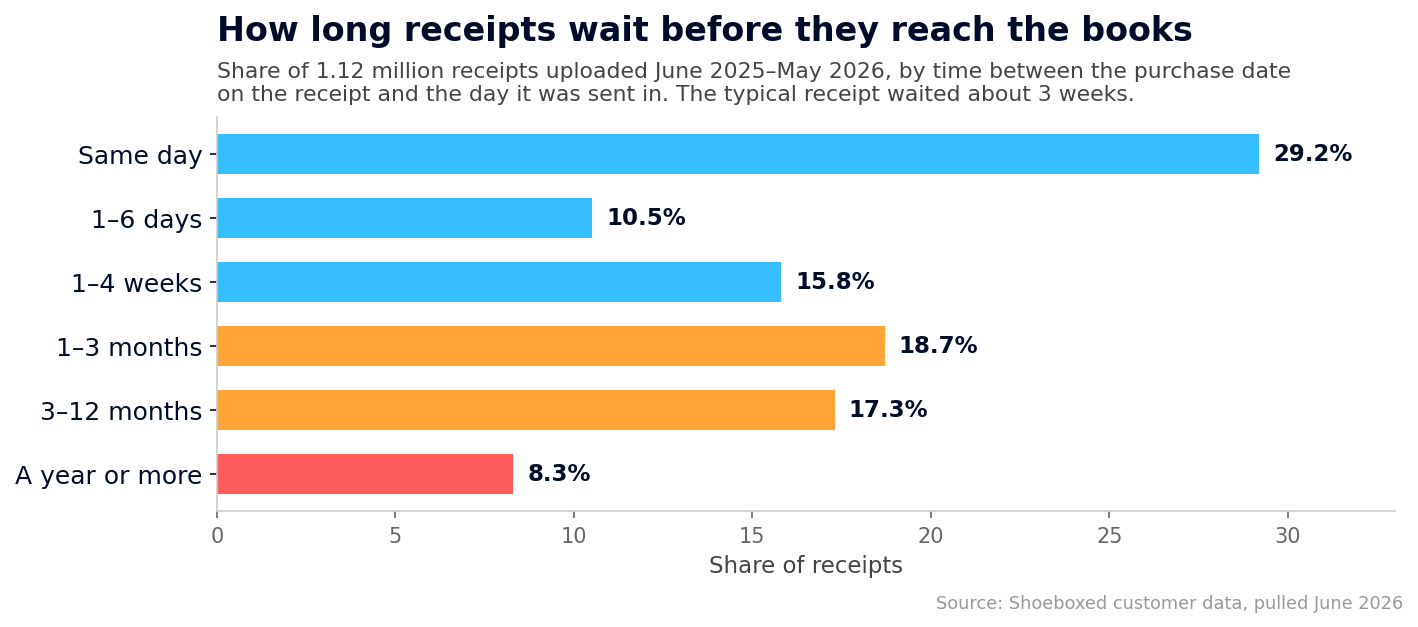 How long receipts wait between the purchase date and reaching the books, across 1.12 million receipts sent in over the last 12 months.
Some of that lag is on purpose. Magic Envelope customers save up receipts and mail them in batches, so a receipt that waits a few weeks for the envelope is a system working as intended. But a month of batching has limits. Across the full twelve months of receipts with usable dates, 8.3% waited a year or more to reach us, and no envelope schedule explains that.
So pick the period on purpose, and make it a month. Run the loop twelve times a year and each pass stays small. Receipts are still findable and the bank statement is still short, so the reports stay close to what's true in the business. Our monthly bookkeeping checklist walks the whole routine in order, task by task, and our guide to bookkeeping for independent contractors covers the same monthly routine with the contractor-specific details.
How Shoeboxed keeps the cycle turning for you
Every late receipt in that data is a small failure of step 1, and step 1 is the step you can make automatic. That's the reason Shoeboxed exists. Capture a receipt in any of the five ways from step 1, and it comes back as a line in an IRS-ready expense log, with no typing on your end. Your bookkeeper or CPA can work right inside the account, and since the IRS expects you to keep most records for three years, we keep everything as long as you have an account.
Shoeboxed starts at $9 a month, and web signup carries a 30-day money-back guarantee: try it for a month, and if it isn't for you, we refund the money. Start a Shoeboxed account → The mobile app comes with a 7-day free trial, no payment required up front:


And if you want more out of step 5's reports, two deductions that go missing from a lot of books have free tools: the home office calculator and the mileage log template.
Frequently asked questions
What are the 5 steps of the accounting cycle?
The five steps of the accounting cycle are:
- Record every transaction while you still have the receipt.
- Enter each transaction in the journal, the dated list software keeps.
- Sort the entries into accounts in the ledger, one category per bucket.
- Check that the totals balance by matching the books against the bank statement.
- Produce the financial statements, then close the books for the period.
What's the difference between the 5-step and 8-step accounting cycle?
They describe the same loop at different zoom levels. The 8-step version spells out the hand-bookkeeping mechanics, with trial balances, a worksheet, and adjusting entries in the middle. Bookkeeping software runs those middle steps on every entry, so the owner's version collapses to five. Most of the textbook's extra steps are balance checks that fold into one modern step: check that the totals balance.
What is the first step in the accounting cycle?
The first step is recording transactions. Capture each sale, purchase, and payment with its supporting document while you still have it. Every later step works from this raw material, so a transaction missed here stays missing all the way to the tax return.
What is the last step in the accounting cycle?
The last step is producing the financial statements and closing the books. The close locks the finished period so its numbers stop changing, and the cycle starts fresh for the next period.
How long does the accounting cycle take?
The cycle covers one accounting period, and you choose the period: a month, a quarter, or a year. The work shrinks when the period does: a month's books take minutes to check, while a year of catch-up can eat a whole weekend. In our customer data, the typical receipt waits about three weeks to get recorded, so a monthly close matches how the paper behaves.
Do small businesses need the full accounting cycle?
Yes, but not by hand. A sole proprietor on the cash method covers the whole cycle with receipt capture, software that journals and posts on its own, a monthly reconcile, and a profit-and-loss report at close. That's the full loop, sized to fit on one person's desk.
About the author
I'm Doug. I bought Shoeboxed in late 2025 with an SBA loan and 5% down, so I run a small business and sweat the same tax bill you do. The April kitchen table at the top of this article was mine for years. I write these guides because the surest way to grow Shoeboxed is to help people keep more of what they earn.
Sources
- IRS Publication 583: Starting a Business and Keeping Records
- IRS Publication 538: Accounting Periods and Methods
- IRS Schedule C Instructions
- IRS: How long should I keep records?
- Shoeboxed customer data: aggregate analysis of 1,123,602 receipts uploaded June 2025 through May 2026 across 6,623 active accounts, plus 3.4 million receipts uploaded since January 2024 across 12,597 active accounts (category data). Pulled June 2026.
30 Seconds Could Save You Thousands on Taxes
Self-employed? Get an instant, personalized tax-savings estimate.




 4.4 / 5 on