Uber Driver Expenses Spreadsheet: Free Google Sheets Template
Free Uber driver expenses spreadsheet for Google Sheets. Copy it to your Drive, log your driving, and get a clean Schedule C number. It even compares standard mileage against actual expenses for you.

Updated June 2026.
An Uber driver expenses spreadsheet is a tracker that logs your miles and every cost of driving (platform fees, phone, car washes, tolls) so the totals drop onto Schedule C at tax time. The free Google Sheets version on this page also reconciles your 1099-K and picks the bigger of the standard-mileage and actual-expense deductions for you.
Here's a free Uber driver expenses spreadsheet for Google Sheets. It tracks your mileage, platform fees, phone, car washes, and tolls, and it maps each expense to the right line on Schedule C.
What you get: a Google Sheets tracker you can copy straight to your Drive, with Excel and PDF versions if you'd rather work there.
What it does for you: it compares the 1099-K tax form Uber sends you against what hit your bank. It also totals the standard mileage deduction next to your real car costs and shows which method deducts more.
Heads up: your 1099-K reports more money than Uber ever sent you. That's not a mistake. There's a section below that shows how to subtract Uber's fees so you don't pay tax on money you never got.
"Across 22,375 receipts scanned by 23 Uber and Lyft drivers, gas receipts show up in 18 accounts but a mileage log in only 5, and a car wash appears exactly once: a single $6 receipt."
Wondering if your pile of gas receipts pays off at tax time? Here's whether gas receipts count for taxes for gig drivers.
Shoeboxed customer data, June 2026
Get the Uber driver expenses spreadsheet
Copy the template to my Google Drive →
Prefer a different format? Download as Excel (xlsx) · Download as printable PDF
We don't ask for your email and there's no signup (but look for a special bonus deal inside the template); the file is yours. Tap the link, sign in to your free Google account if it asks, and tap the blue "Make a copy" button. The copy lands in your Google Drive, ready to edit.
The main tab works in three steps.
Step 1: subtract Uber's fees. Type in your gross fares (the full amount riders paid) and Uber's fees. Both numbers sit in your Uber Tax Summary, which Uber posts in the Driver app every year. The sheet shows what hit your bank and carries the fees into your deduction total.
Step 2: enter your miles. Put in your business miles and your total miles for the year. The sheet works out your business-use percentage and your standard-mileage deduction at the 2026 IRS rate of $0.725 a mile.
Step 3: log expenses as they happen. Enter one row per receipt, then tap the Category cell and pick from the dropdown. The sheet fills in the Schedule C line for you and tags whether that cost counts under both vehicle methods or only the actual one.
At the bottom, the sheet totals Method A (standard mileage) next to Method B (actual expenses) and highlights whichever deducts more. Most worksheets make you run that comparison by hand, so we built this one to do it for you.
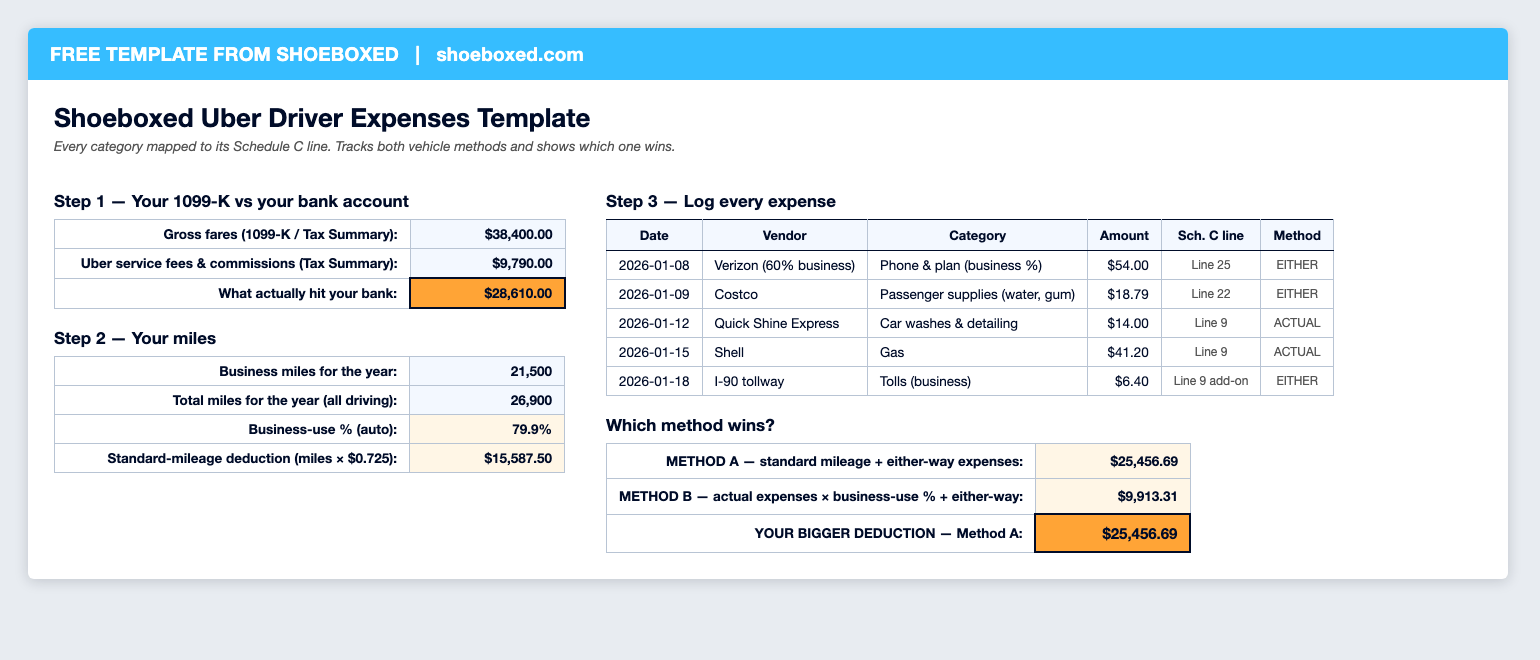 The main tab with sample numbers: the 1099-K block, the mileage block, the expense log, and the Method A vs Method B comparison at the bottom right.
You also get two bonus tabs, a mileage log and a home office log, plus a 25%-off Shoeboxed coupon as a thank-you for copying the template.
If you only do one thing on this page, copy the template. The rest of this article covers the rules: the tax trap hiding in your 1099-K, which vehicle method deducts more, which miles count, and the full list of what an Uber driver can write off.
Your 1099-K shows money you never got
Pull up your 1099-K and compare it to your bank deposits. The 1099-K number comes in bigger, and the gap is the fees Uber took out before paying you.
Uber's own tax page explains why:
Gross earnings are the total amount paid by riders and Uber Eats users for the rides and/or deliveries you completed.
That's the total riders paid, not the total Uber passed along to you. Uber's service fee and booking fees sit inside that number, and the IRS gets a copy saying you earned all of it.
The fix takes one line on your tax return. Find your Uber Tax Summary in the driver app; it breaks out the fees Uber charged you. That fee total goes on Schedule C line 10, "Commissions and fees," and it comes straight off the profit you pay tax on. The spreadsheet's Step 1 does the math for you: type in your gross fares and Uber's fees, and the deduction lands in your total.
Skip that step and you pay income tax plus 15.3% self-employment tax on money you never took home.
One housekeeping note while we're here. The IRS requires platforms to send a 1099-K once you cross $20,000 and more than 200 transactions, and Uber may send one at lower amounts. If no form shows up, you still report what you earned. The income is taxable either way; the form is just the copy the IRS gets.
Standard mileage or actual expenses: pick the bigger deduction
The IRS gives you two ways to write off your car, and you only get to use one of them each year. For most drivers, standard mileage wins; here's how to check that you're not the exception.
Standard mileage: log your business miles, and the IRS lets you deduct 72.5 cents per mile for 2026. That one rate covers the whole car: gas, repairs, insurance, and depreciation.
Actual expenses: save every car receipt (gas, oil changes, car washes, insurance, repairs) and deduct the business-use share of the total.
Here's the math. Drive 8,000 business miles part-time and standard mileage hands you a $5,800 deduction without saving a single gas receipt. A full-timer doing 30,000 business miles gets $21,750. To beat that $21,750 with actual expenses, you'd need to spend $29,000 a year on the car with three-quarters of your driving for work. Few drivers spend that, so standard mileage usually wins.
Two rules matter before you pick.
The first-year rule. IRS Pub 463 says it directly: "If you want to use the standard mileage rate for a car you own, you must choose to use it in the first year the car is available for use in your business." After year one you can switch methods year to year. Pick actual expenses in year one, and standard mileage is off the table for that car for good.
No double-dipping. Pub 463 again: "If you use the standard mileage rate for a year, you can't deduct your actual car expenses for that year." Gas, oil, repairs, insurance, and car washes are all baked into the 72.5 cents. The two car costs that still deduct on top are business tolls and parking.
How you lose the deduction: tracking gas receipts instead of miles. Without a mileage log you can't claim the 72.5 cents a mile, and a pile of gas receipts only counts under the actual method, which usually pays less.
The spreadsheet keeps the two methods straight for you. Every category in the expense log carries a tag, either-method or actual-only. The bottom of the sheet puts Method A next to Method B and highlights the winner.
Which miles count as business miles
Uber tracks part of this for you. Your annual Tax Summary includes, in Uber's words, "miles driven while using the Driver app." That covers the miles with a rider in the car, the drive to each pickup, and the stretches between trips while you stay online.
Three kinds of business miles never make Uber's number:
- Supply runs, like the Costco trip for water flats or the drive to the car wash between shifts
- The trip to your rideshare vehicle inspection
- Every mile you drive for Lyft or another platform, because each app only sees its own miles
The IRS wants your own record either way: the date, the miles, where you went, and the business purpose. Keep that log in the spreadsheet's Mileage Log tab, one row per driving day ("Jan 9, downtown loop, Friday night driving, 118 miles"). That's the paper trail that holds up if the IRS ever asks how you got your number.
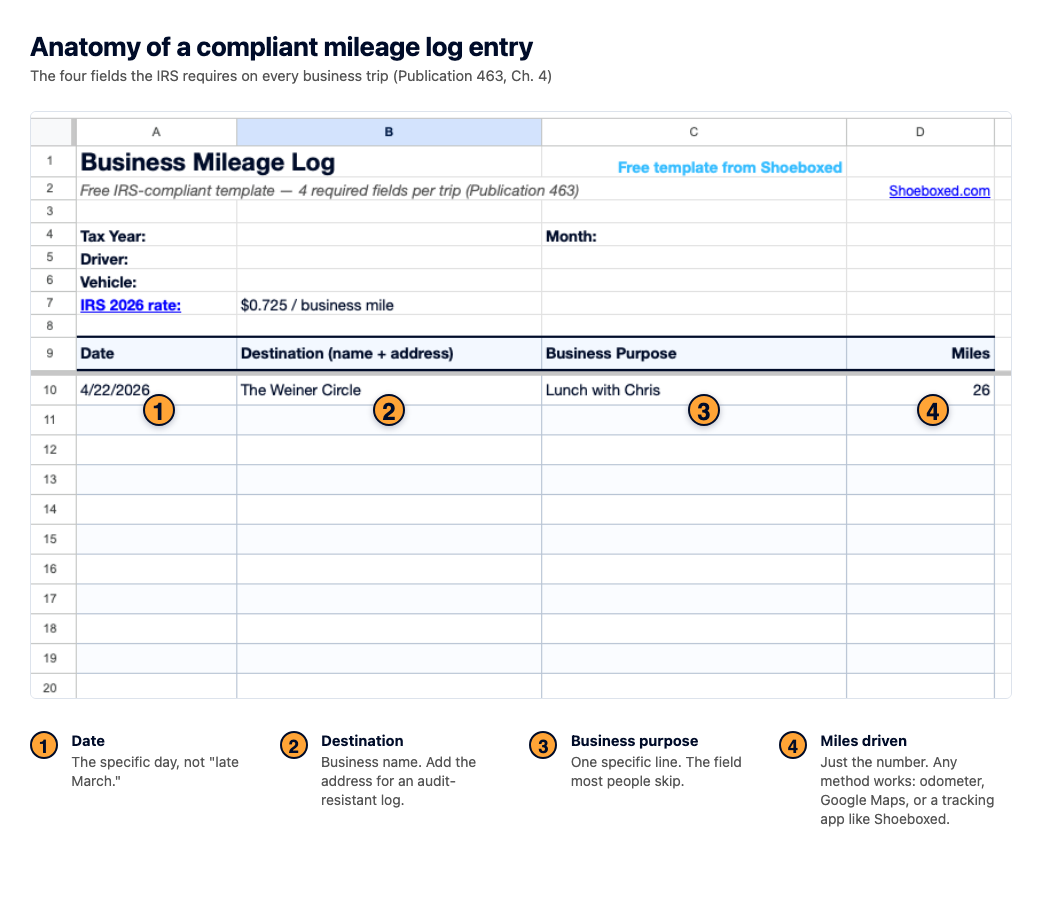 The four fields the IRS wants for every driving day. The spreadsheet's Mileage Log tab has a column for each.
Every Uber driver deduction, mapped to Schedule C
Schedule C is the one-page form where your driving income and expenses land. Every expense below goes on a specific line, and the spreadsheet tags each row with the right one, so April becomes a copy job instead of a research project.
| Expense | Schedule C line | Deducts with standard mileage? |
|---|---|---|
| Business miles × $0.725 | Line 9 | This IS the deduction |
| Uber's fees and commissions | Line 10 | ✓ Yes |
| Phone and plan (business share) | Line 25 | ✓ Yes |
| Phone mounts, chargers, cables | Line 22 | ✓ Yes |
| Passenger water, gum, mints | Line 22 | ✓ Yes |
| Dash cam | Line 27a | ✓ Yes |
| Tolls and parking while working | Line 9 (add-on) | ✓ Yes |
| Airport and city rideshare permits | Line 23 | ✓ Yes |
| Vehicle inspections | Line 23 | ✓ Yes |
| Mileage tracking app | Line 18 | ✓ Yes |
| First aid and safety kit | Line 22 | ✓ Yes |
| Gas | Line 9 | ✗ Actual method only |
| Oil changes, tires, repairs | Line 9 | ✗ Actual method only |
| Car washes and detailing | Line 9 | ✗ Actual method only |
| Auto insurance and rideshare endorsement | Line 9 | ✗ Actual method only |
| Roadside assistance plan | Line 9 | ✗ Actual method only |
A note on the phone, because this one is easy to miss. Your phone runs the whole business, so the business share of the bill deducts on line 25. Say driving apps eat 60% of your phone use. Then 60% of a $90 plan counts, which is $54 a month, or $648 a year , for a bill you were paying anyway.
The meal question, answered honestly. Lunch during a shift doesn't deduct, even though it feels like it should. Pub 463 reserves travel meals for trips that take you away from your tax home long enough to need sleep or rest, and it closes the loophole by name: "This rest requirement isn't satisfied by merely napping in your car." A shift in your own city doesn't qualify, no matter how long it runs. The water and gum you buy for passengers is a different story; that's a business supply on line 22, and it deducts in full.
Most drivers can't claim a home office. The IRS wants a space used regularly and exclusively for business before it allows a home office deduction, and for most drivers the workplace is the car. If you drive full time and run the books from a dedicated desk, the home office calculator shows what that corner of your house is worth in about thirty seconds.
What 23 Uber and Lyft drivers tracked (and what they skipped)
We went looking through the Shoeboxed receipt archive for rideshare drivers. The giveaway was the category names; nobody but a driver creates expense folders called "Uber Gas," "Lyft Car Upkeep," or "Goodies for Lyft." Twenty-three accounts fit the pattern, with 22,375 receipts scanned between 2013 and 2020.
I expected gas to lead the list, and it did. The bottom of the list is the part that surprised me.
Here's what those drivers tracked:
- Gas: 18 of 23 accounts , the deduction everyone remembers.
- Passenger supplies: 10 of 23. Water, gum, and mints for the back seat.
- Maintenance and repairs: 8 of 23.
- Tolls and parking: 7 of 23.
- Mileage: 5 of 23.
- Phone: 2 of 23.
- Car washes: one receipt. A single $6 car wash across 22,375 receipts, filed under a category the driver named "Auto - Wash Rideshare."
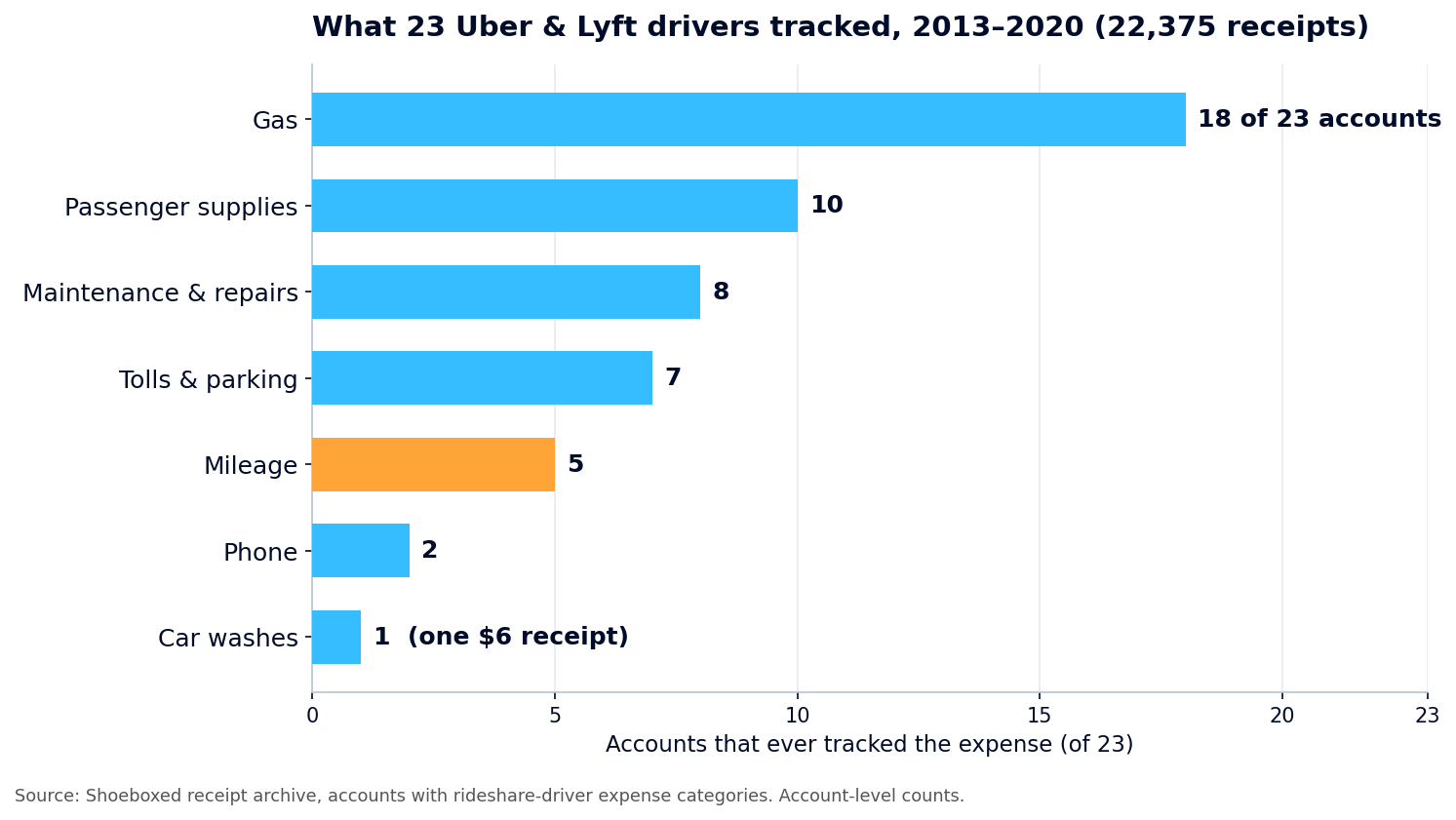 Account-level counts from the Shoeboxed receipt archive. Mileage, the biggest deduction, sits in fifth place.
Look at the bottom of the list. The biggest deduction in rideshare, the 72.5 cents a mile, shows up in 5 accounts out of 23. The phone bill, a deduction every driver has, shows up in 2. And across seven years of receipts, a car wash appears exactly once, for $6.
Now look at the top. Gas, the receipt most of them save, doesn't even count under the method most of them should be using.
Drivers save the receipt that's easy to grab and skip the log that carries the bigger deduction. We built the sheet around that pattern: the mileage block sits above the expense log, and the method comparison runs on every pass.
The mileage log that fills itself
The spreadsheet works. Every rule in this article is built into it, and you can run a whole tax year off it for free.
One honest caveat: the sheet's mileage tab is manual work. One row per driving day, every day, all year. Skip a few weeks and the year-end number turns into a guess, and a guess is what the IRS won't take. The manual log is the part people give up on, and it's the reason the 5-of-23 number above looks the way it does.
If manual logging isn't for you, that's the part Shoeboxed automates. I bought the company in late 2025, and the mileage tracker is the feature I'd hand a driver first. The app tracks every drive on GPS in the background, so you don't open anything before you pull out of the driveway. When your driving day ends, it texts you the list of trips, numbered, and you reply with which ones were business. Reply the way you'd text a friend; "1 and 3 were business" works fine. Each business trip becomes a PDF mileage receipt with a map, the date, the miles, and the IRS rate, kept in your account so it's there at tax time. (The deeper writeup with screenshots is in our mileage log template article.)
Receipts ride along too. Snap the car-wash receipt with your phone, forward the toll statement from your email, or turn on Gmail sync and let it pull receipts out of your inbox on its own. Mail us the paper pile in a Magic Envelope; our team in Durham scans it, and our software reads off the date, total, vendor, and category. And if you split your week between Uber, Lyft, and a delivery app, the gig drivers page shows how the whole setup fits together.
If you want to try it, the mobile app comes with a 7-day free trial and no payment up front.


Prefer the desktop? Start on the web, where plans begin at $9 a month with a 30-day money-back guarantee.
Questions drivers ask
Can Uber drivers write off gas?
Only if you use the actual-expense method. If you claim the standard mileage rate, gas is already inside the 72.5 cents a mile, and deducting it again is double-dipping the IRS won't allow. Run both methods in the spreadsheet before you decide; for most drivers the mileage rate wins even after the gas receipts are thrown out.
Does Uber track my miles for taxes?
Partly. Your annual Tax Summary reports the miles you drove while using the Driver app, and that number is a fine starting point. It can't see your supply runs, your inspection trips, or anything you drive for other platforms, and your own log is the record the IRS asks for. Keep one anyway.
Do I have to pay taxes quarterly?
For most drivers, yes. Nobody withholds taxes from your fares, and the IRS wants tax paid as you earn, in four payment periods through the year. Underpay a period and you can owe a penalty even if a refund comes back in April. The spreadsheet's running profit number is what you estimate from.
What if I drive for both Uber and Lyft?
It's all one driving business on one Schedule C. Combine the income from both 1099-Ks, deduct both platforms' fees on line 10, and keep one mileage log that covers every hour online, whichever app the ride came from.
Copy the template, fill it in as you drive, and keep more of what you earned. Helping you keep more of your hard-earned money is the whole point.
About the author
I'm Doug. I bought Shoeboxed in late 2025 with an SBA loan and 5% down, so I run a small business and sweat the same receipts and the same tax bill you do. Before this I spent years running Earth Class Mail. I write these guides because the surest way to grow Shoeboxed is to help people keep more of what they earn, and because I take a lot of Ubers and always ask the driver how business is going.
Sources: IRS Publication 463 (vehicle expenses, first-year election, travel meals) · IRS 2026 standard mileage rate announcement · Schedule C instructions · IRS: Understanding your Form 1099-K · IRS: Self-employment tax · IRS: Estimated taxes · Uber: Tax information for drivers
30 Seconds Could Save You Thousands on Taxes
Self-employed? Get an instant, personalized tax-savings estimate.




 4.4 / 5 on