How to Keep Receipts from Fading (and What to Do When They Already Have)
Why receipts fade, how to slow it down, and the one copy that never fades. Built on data from 3.5 million real receipts.

Updated June 2026
Receipts fade because most of them print on heat-sensitive thermal paper, and that print keeps reacting to heat, light, and friction long after you walk out of the store. You can slow the fade by keeping a receipt cool, dark, and flat. You can't stop it. The only copy that never fades is a digital one. So the real fix is to capture each receipt before the ink gives out: snap a photo with the app, or mail a pile of paper in to us in a Magic Envelope and we scan it for you.
Pull an old receipt out of your wallet and there's a fair chance you'll find a blank slip of paper where the numbers used to be. That's not your fault, and it's not a fluke: the paper was built to fade.
Since 2007, my company has scanned over 57 million receipts for more than 552,000 small businesses, so we see faded receipts all day long. Of the 3.5 million receipts customers have sent us since January 2024, 15.5% came in with no payment type our software could read off the image. Some of those slips never printed the card line in the first place. A lot of them simply faded past the point where a scanner, or a person, can read them.
"Of the 3,502,360 receipts customers sent Shoeboxed since January 2024, 15.5% arrived with no payment type our software could pull off the image."
Shoeboxed customer data, 2024–2026
Paper also tends to sit before anyone stores it, and sitting is when fading happens. Of the receipts customers mailed in to us this spring, the typical one had already waited about two months, and 1 in 10 was more than a year old.
Two simple moves keep you ahead of the fade. Snap a photo of each receipt with our app the day you get it. Or, if a pile is already building up, drop the whole stack in a postage-paid Magic Envelope, mail it to us, and we scan it for you before any more of it fades.
Why receipts fade in the first place
Most store and restaurant receipts print on thermal paper, which uses no ink. Instead, the paper is coated with a dye and a chemical developer, and the printer's hot print head melts them together to make the dark marks you read. That's why a register receipt feels smooth and shiny.
The catch is that the coating never stops reacting. The U.S. National Archives, which has to worry about records lasting for centuries, puts it plainly:
"Thermal papers are sensitive to heat and light, will react with chemicals found in ordinary office environments (including markers, cosmetics, and some types of plastic folders), and may contain impermanent dyes."
National Archives and Records Administration, Bulletin 96-03
So the things that wreck a receipt are everywhere in normal life:
- Heat. A hot car, a sunny windowsill, or a back pocket warmed by your body sets off the same reaction the print head used. More heat, more fading.
- Light. Sunlight is the fast one. A receipt left face-up on a dashboard washes out far quicker than one in a drawer.
- Friction and pressure. Coins, keys, and the rub of a wallet smudge and lift the print.
- Oils and plastics. Hand lotion, the oil on your fingers, and some plastic sleeves react with the coating and lift the marks right off.
Here's one that came through our own scanners. A customer mailed it in, and our software could still make out the date, August 2011. The store name and the total were gone for good.
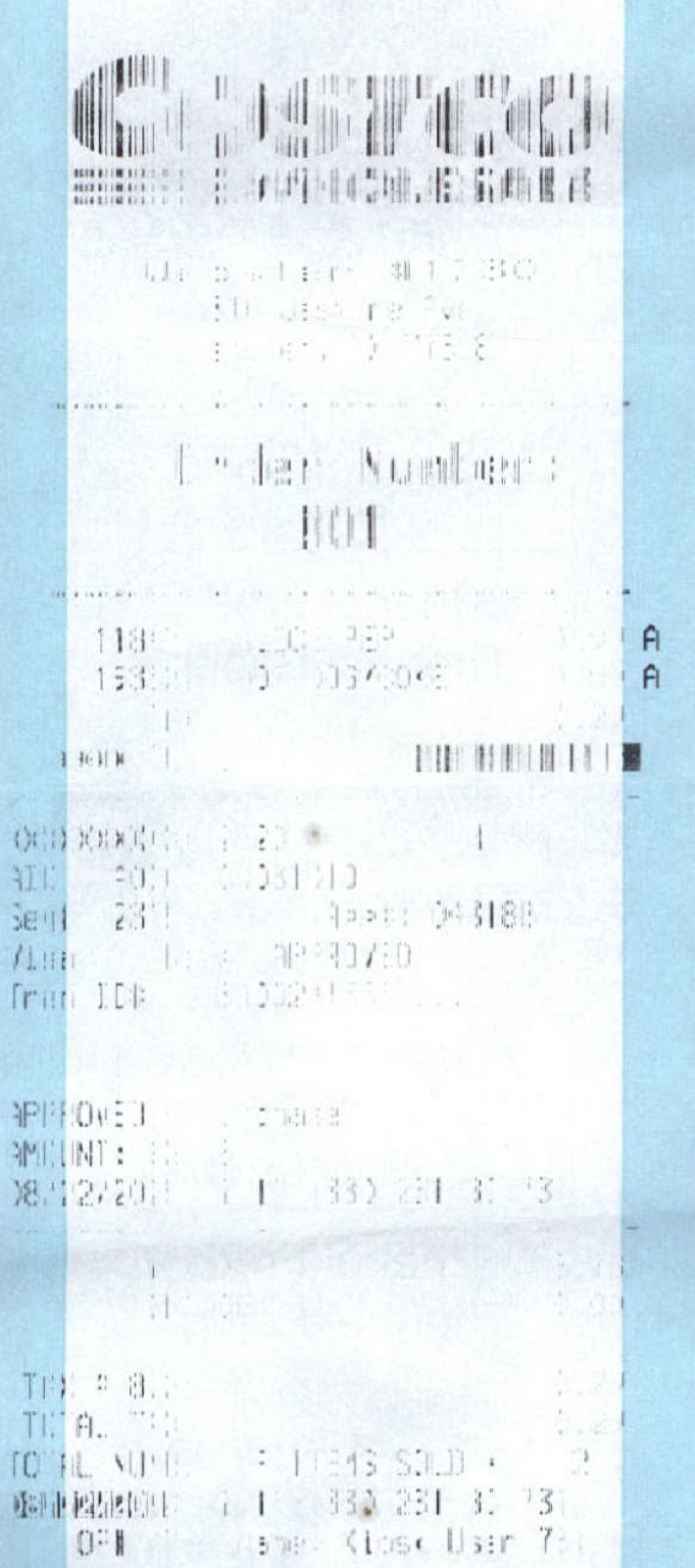 A real receipt that reached us faded almost to nothing. Our software read the date; the rest was gone.
The hard truth: you can slow fading, but you can't stop it
I'll be straight with you, because a lot of articles on this won't. There is no way to make a thermal receipt last forever. The same National Archives guidance says the print "may begin to deteriorate in as few as six months," and that when it goes, "the text is likely to fade and become illegible or the whole paper surface may darken, making the image indistinguishable."
Read that last part again. A fading receipt doesn't always turn white. Sometimes the whole thing turns dark instead, which is why the heat tricks you'll read about online so often backfire. More on those below.
The point isn't to give up. The trick is to stop trying to make the paper last forever, and just keep it readable long enough to make a digital copy, because that copy is the one that lasts.
How to make a paper receipt last longer
When you have to hang on to the paper for a while, these habits buy you time. Each one fights one of the causes above.
- Keep it cool and dark. A drawer or a folder inside the house beats a car, a windowsill, or a sunny counter. Heat and light are the two fastest killers.
- Store it flat and on its own. Don't fold it through the printed area, and don't let it press against coins or keys.
- Don't tape it. The adhesive reacts with the coating and turns the line under the tape black. A paper clip is fine.
- Keep it away from other receipts. Thermal slips can mark each other when their coated faces touch. Slip a plain sheet of paper between them.
- Handle it as rarely as you can. Every touch leaves a bit of oil, and the less you handle a receipt, the longer it reads.
All of this slows the clock. None of it stops it. The only version of a receipt that never fades is one you've captured as an image, so the smartest move is to make that copy early and stop worrying about the paper at all.
The only fade-proof receipt is a scanned one
A photo or a scan doesn't fade. It doesn't smudge in a wallet or wash out on a dashboard. And the National Archives' own fix for fading thermal paper is to copy it onto something stable the day it arrives. They wrote that in 1996 about fax paper, and the modern version is a photo from your phone.
It's also what the IRS expects for your records. In its own words, "all requirements that apply to hard copy books and records also apply to electronic records." A scan counts. What has to survive on it is who you paid, the date, the amount, proof you paid, and what you bought, so a clear, complete image does the job a faded slip can't.
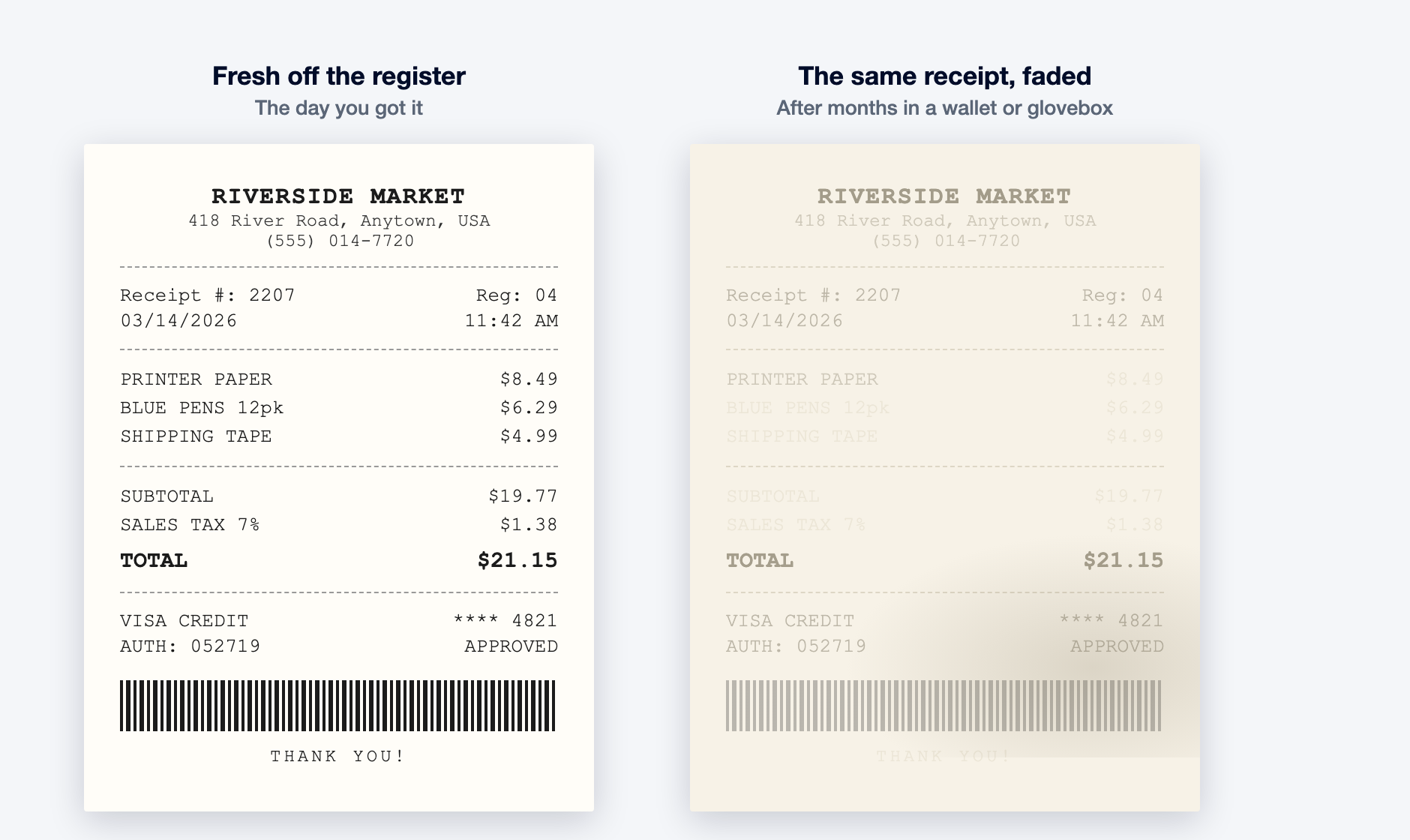 The same receipt, fresh and faded. The copy you make on day one looks like the version on the left forever. (Riverside Market is made up for the example.)
This is what my company does, so here's the plain version. Shoeboxed keeps the actual receipt image, not just a typed-out summary, and our software reads each one and pulls off the vendor, the date, and the total. You can get receipts in five ways:
- Snap a photo of a paper receipt with the mobile app, right there in the parking lot.
- Mail the pile in a Magic Envelope. Drop your paper receipts in the postage-paid envelope, send it, and our team in Durham scans the whole stack. This is the easiest way to clear a drawer of fading paper without snapping each one yourself.
- Upload files and PDF receipts from your computer.
- Forward email receipts to your account's own email-in address.
- Connect your Gmail, and Shoeboxed finds the receipt emails in your inbox on its own.
Whichever door you use, the image lands in one searchable place and stops fading the moment it's captured. Want the deeper how-to on capture? Our guide to the transaction receipt covers which slips carry the numbers that settle a dispute. The receipt organization guide walks through keeping the whole pile in order.
Can you fix a receipt that already faded?
Maybe, but keep your expectations low, and skip the advice that does more harm than good.
The most common trick online is to heat the receipt with a hairdryer, a lamp, or an iron. Sometimes that pulls faint text back for a moment. Just as often it does what the National Archives warned about and turns the whole slip dark, which destroys it for good. Heat is what fades the paper in the first place, so the trick that's supposed to save the receipt is the same thing that can finish it off. If you try it at all, use the lowest, coolest setting, hold it back a few inches, and stop the second anything starts to darken. Never set an iron straight onto the paper.
A gentler option works better, and it can't hurt the receipt. Lay it flat in good light and take a photo, then open that photo in your phone's editor and raise the contrast or pull down the shadows. That often makes faint marks readable without touching the paper at all. It won't bring back print that's truly gone, but it rescues the in-between cases.
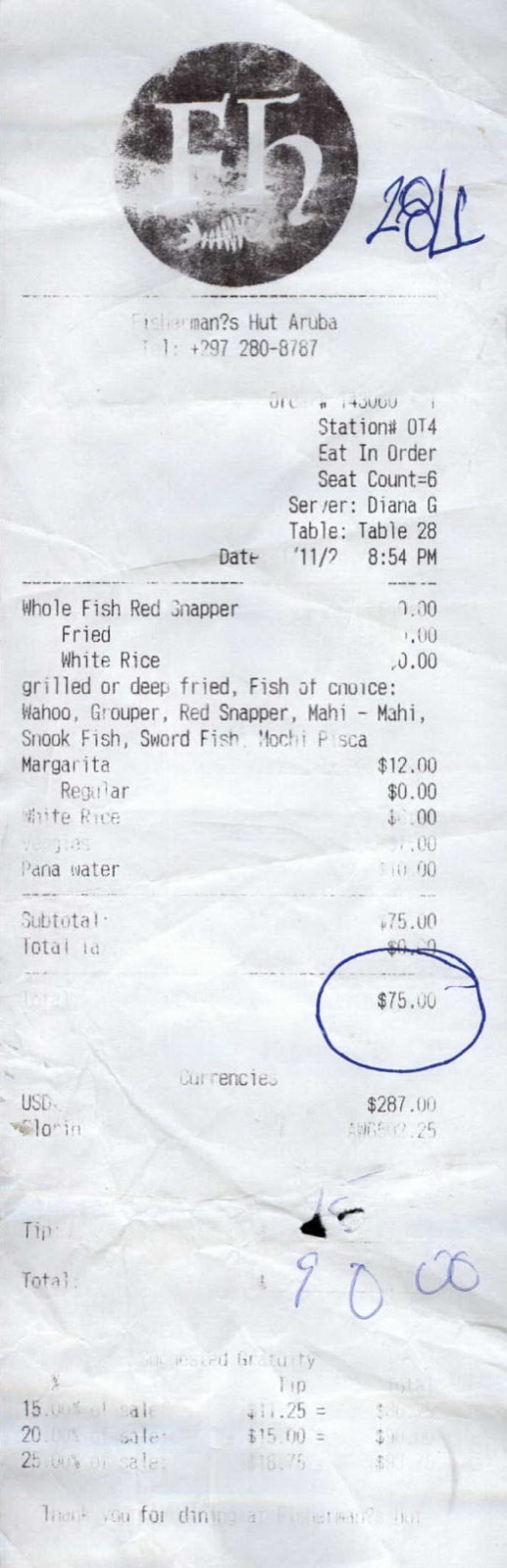 Faded and crumpled, but not gone. This 2011 restaurant receipt reached us years late, and our software still read the vendor, the date, and the $90 total. Catching one at this stage is the in-between case worth saving.
When the receipt is past saving, you usually don't need the paper anyway. The purchase still happened, and you can rebuild the proof. Your card or bank statement shows the date, the amount, and the merchant, and many stores can reprint a receipt from your card number or loyalty account. Our guide on the lost receipt walks through rebuilding a record when the original is gone. The IRS receipt requirements guide covers the cases where a statement is enough on its own.
The honest summary: restoring a faded receipt is a long shot, but replacing the proof is usually easy. Capturing the receipt before it fades is easier than both.
Start before the next receipt fades
If a drawer of graying receipts is staring at you, start with the oldest and the shiniest, since those are closest to blank, and photograph your way forward. Better yet, drop the whole backlog in a Magic Envelope, mail it in, and let us scan it while you get on with your day.
On the web, Shoeboxed starts at $9 a month with a 30-day money-back guarantee: try it for a month, and if it isn't for you, we refund the money. Start a Shoeboxed account → Prefer to start from your phone? The mobile app comes with a 7-day free trial, no payment required up front:


A readable receipt is also money you don't hand back at tax time. If you work from home, our free home office calculator shows what your space could be worth on a Schedule C.
Helping you keep more of your hard-earned money is the whole point.
Frequently asked questions about faded receipts
How do I fix a faded receipt?
First, try the gentle route: lay it flat in good light, take a photo, and raise the contrast on your phone to pull out faint marks. Be careful with heat tricks like a hairdryer or iron. They sometimes reveal text, but they just as often turn the whole slip dark and ruin it, because heat is what fades thermal paper in the first place. If the receipt is truly gone, rebuild the proof from your card statement or a store reprint instead.
How long do receipts last before fading?
It depends on how they're stored, but not as long as people expect. The U.S. National Archives says thermal paper "may begin to deteriorate in as few as six months." A receipt kept cool and dark can stay readable for a few years. One left in a hot car or on a sunny dashboard fades far faster. Either way, the safe assumption is that a paper receipt won't outlast a three-year tax window, so capture a digital copy early.
Will tape preserve a receipt?
No, and it often does the opposite. The adhesive in tape reacts with the heat-sensitive coating on thermal paper and turns the line underneath dark, which can blot out exactly what you were trying to save. If you need to attach a receipt to something, use a paper clip, or better, take a photo and skip the paper handling altogether.
What makes receipt ink fade?
Thermal receipts aren't printed with ink. The image is made by a heat-sensitive coating, and that coating keeps reacting to its surroundings. Heat, sunlight, friction from coins and keys, and contact with oils or some plastics all break the marks down. The National Archives notes that thermal paper even reacts with everyday things like markers, cosmetics, and some plastic folders.
About the author
I'm Doug. I bought Shoeboxed in late 2025 with an SBA loan and 5% down, so I run a small business and sweat the same tax bill you do. The receipt numbers in this article come straight from our own scanning operation in Durham. I write these guides because the surest way to grow Shoeboxed is to help people keep more of what they earn.
Sources
30 Seconds Could Save You Thousands on Taxes
Self-employed? Get an instant, personalized tax-savings estimate.




 4.4 / 5 on