How to Store Receipts (and How Long to Keep Them)
How to store receipts so they survive until tax time. IRS retention windows, scan rules, and data from 293,272 real receipts.

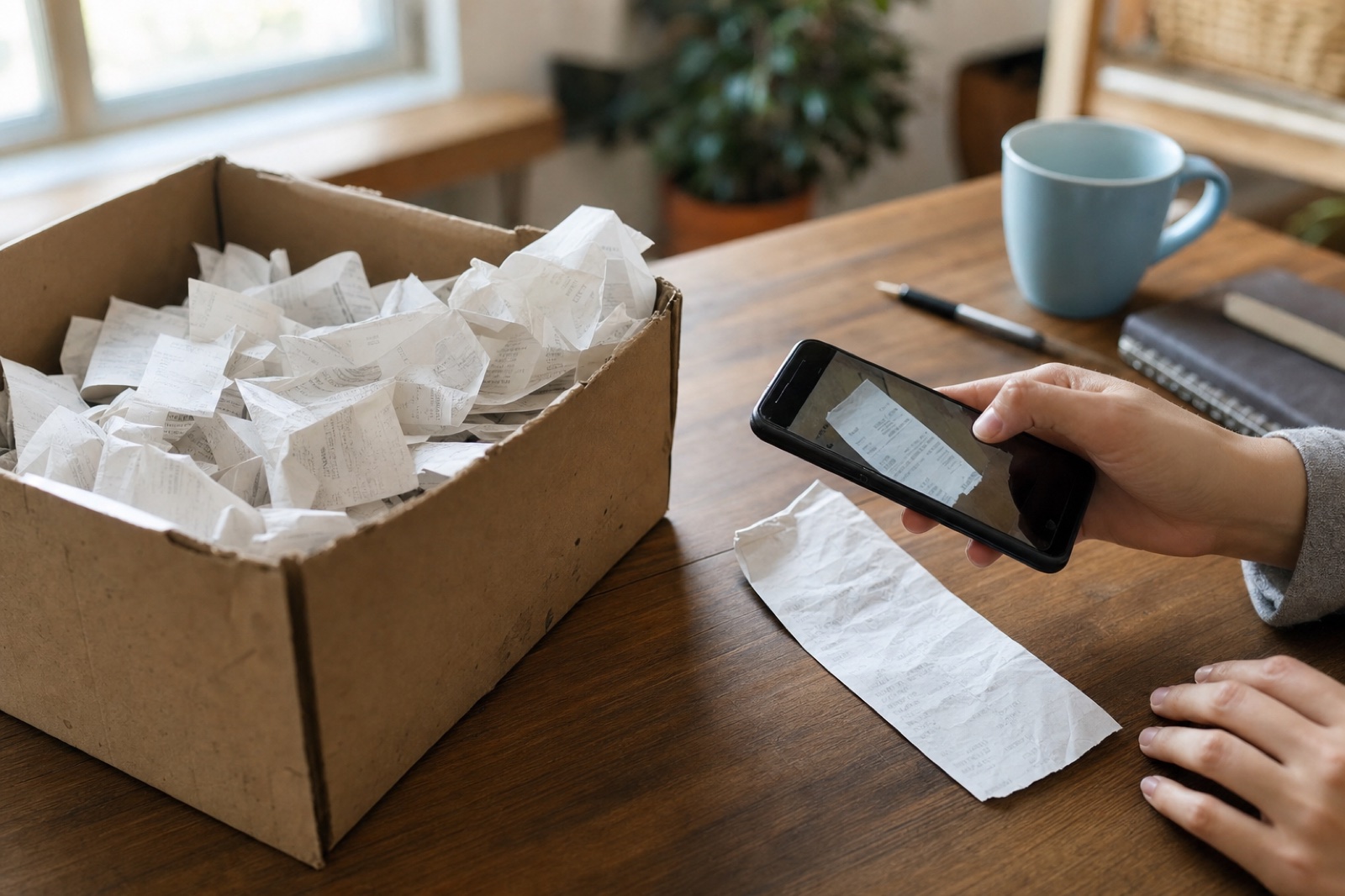
Updated June 2026
Store receipts by capturing a digital copy the same week you get them, then keep every copy in one searchable place. The IRS accepts electronic records, and most tax records need to last three years, with some situations stretching that to six or seven. Most receipts print on thermal paper, and that print fades fast. The digital copy is the one that survives.
Every receipt you can't read at tax time is a deduction you hand back to the IRS. The fix is to store receipts digitally. Snap a photo of each paper receipt the week you get it, or mail the whole pile to Shoeboxed in a postage-paid Magic Envelope and we scan it for you. Forward email receipts to the same place, and keep everything for at least three years. If paper has to wait, keep it somewhere dark and cool so it doesn't fade.
Since 2007, my company has scanned over 57 million receipts for more than 552,000 small businesses. This spring I pulled the numbers on 293,272 of them, and the data shows where storage goes wrong. People wait too long, and their receipts fade, or they lose them.
"Of the 293,272 receipts that 3,524 businesses stored with Shoeboxed from March to May 2026, paper receipts mailed in had already sat a median of 70 days. Receipts captured by app or email were stored at a median of 1 day old. And one in ten receipts was more than a year old by the time it was stored."
Shoeboxed customer data, June 2026
How to store receipts, in 30 seconds
- Capture every receipt within a week. Snap paper receipts with your phone, forward email confirmations, and save PDFs the day they arrive.
- Mail big paper piles in a Magic Envelope. If you get a lot of paper receipts, send them to Shoeboxed every week or every month, and at most every quarter. Paper that mails out on a schedule never sits around long enough to fade.
- Keep everything in one place. One home for every format beats five clever folders you'll stop using by March.
- Make sure the key facts survive. The vendor, the date, the amount, what you bought, and proof you paid are what the IRS reads on a receipt.
- Keep tax receipts at least three years. Some situations stretch the window to six or seven years, and the table below has the full list.
- Purge on a schedule. Once the tax window closes you can let the paper go, and for personal purchases, hang on until the return or warranty window passes too.
Store a receipt the same week you get it
When we split our spring receipts by how they arrived, the gap stopped me cold. These were the same kinds of businesses turning in the same kinds of receipts. The ones captured by app or email went into storage at a median of 1 day old, while the paper receipts mailed to us had sat a median of 70 days.
Across the whole pile, 44% of receipts sat more than a month before they were stored, and 28% sat more than three months. That waiting period is where receipts die. Most register slips print on thermal paper. People who post about receipts in online forums keep reporting the same thing: the print fades fast, and a slip can turn blank within a year. They blame heat, sunlight, and hot gloveboxes for speeding it up. (Our guide on how to keep receipts from fading covers the chemistry and the fixes.) Here is what that looks like when it comes through our own scanners:
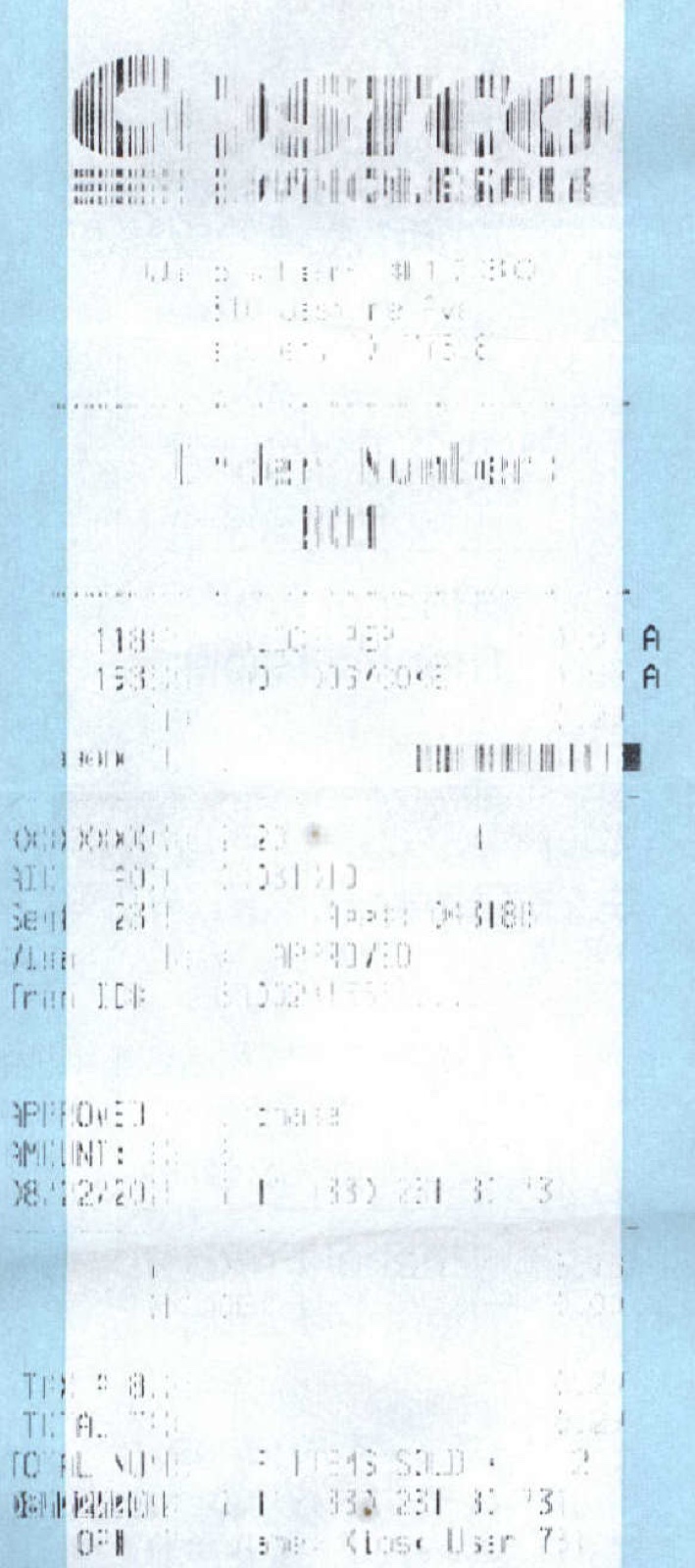 A real Costco receipt dated August 2011 that reached us in a Magic Envelope in 2026, faded almost to nothing. Our software could still read the date, but the items and the total are gone for good.
So the real storage question is not which container to buy but which capture habit you'll keep. A jar on the counter does store receipts, but it stores them while they fade. The best way to store receipts is whichever method gets a digital copy made within seven days, because that copy never fades.
How long the IRS says to keep receipts
The advice that gets passed around runs from "shred everything after a year" to "keep every scrap for seven years." Both are wrong for most people. The IRS publishes the real windows, and the normal case is three years.
| Your situation | Keep the records for |
|---|---|
| The normal case | 3 years |
| You left more than 25% of your income off a return | 6 years |
| You claimed a loss from worthless securities or a bad debt deduction | 7 years |
| Employment tax records | At least 4 years after the tax was due or paid, whichever is later |
| Receipts for property and equipment | Until the limitations period (the IRS audit window) ends for the year you sell or dispose of it |
| You never filed, or filed a fraudulent return | Indefinitely |
| The IRS retention windows, from the IRS "How long should I keep records?" page, retrieved June 2026. |
Note the wrinkle in the property row. The receipt for a $3,000 computer you depreciate has to outlive the computer, because it proves what you paid for it.
Those windows are also why we built Shoeboxed storage the way we did. We keep every receipt, with its image, for as long as you have an account, and you can export all of it even if you leave someday. A three-year window is easy to honor when nothing gets deleted in the first place.
Yes, the IRS accepts scans and photos
Will the IRS accept a photo of a receipt instead of the paper? People ask me that all the time, and most articles answer it without citing anything. Here is the IRS in its own words, from its recordkeeping pages:
"All requirements that apply to hard copy books and records also apply to electronic records."
IRS, "What kind of records should I keep?"
IRS Publication 583 sets the bar those copies have to meet. The rule reads, "All electronic storage systems must provide a complete and accurate record of your data that is accessible to the IRS." In plain English, a photo or scan counts, as long as it captures the whole receipt and you can pull it up when asked.
What has to survive on that image? The IRS says your supporting documents should identify the payee, the amount paid, proof of payment, the date, and a description of what you bought. A blurry photo that cuts off the vendor name fails the test even though it's digital.
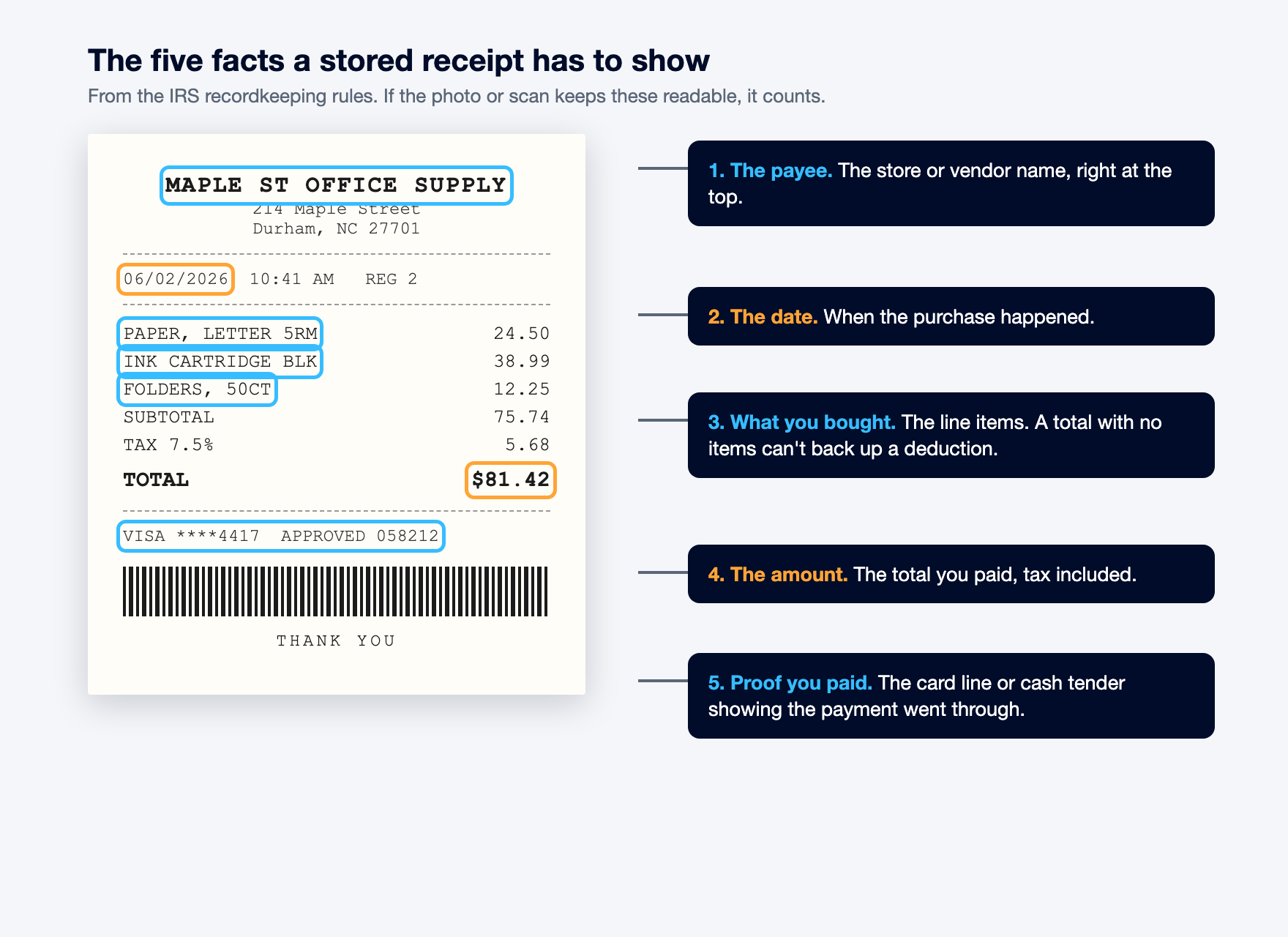 The five facts on a stored receipt. (Maple St Office Supply is made up for the example.)
That rule is the reason Shoeboxed stores the actual receipt image instead of a typed-out summary of it. Our team in Durham scans the paper that comes in, and our software reads each image and pulls out the vendor, the date, and the total. The image itself holds the rest of what the IRS asks for, like the proof of payment and the description of what you bought. You keep the picture and the searchable details together. Our digital receipt guide goes deeper on electronic copies, and the IRS receipt requirements guide covers the few cases where you don't need a receipt at all.
Pick a storage system that matches your receipt volume
Most receipt storage advice argues about the container: accordion file, envelope, or app. Our account data says people sort themselves by how many receipts they handle. Between March and May of 2026, 741 businesses mailed us 106,805 paper receipts, while 2,189 accounts sent 135,280 through the app and other software connected to their accounts. That works out to about 144 receipts per mailing business and about 62 per app account. The bigger the pile, the more hands-off the system people choose.
| Your volume | What you need | A system that holds up |
|---|---|---|
| A few a month (returns, warranties) | Proof until the return or warranty window closes | One labeled envelope by the door, plus a phone photo of anything big-ticket the day you buy it |
| A side business, 10 to 30 a month | Tax-ready records without a filing habit you'll abandon | One digital home for every receipt, plus ten minutes a week to photograph whatever came in |
| A full business, 100+ a month | Capture that keeps up without you typing anything | A service with several ways in, so paper, email, and PDF receipts all land in the same searchable place |
| Match the storage system to the monthly pile, not to the prettiest container. |
If you'd rather run the digital home yourself, the setup is plain. Make one "Receipts" folder in your email, and add a rule that files anything with "receipt" or "order confirmation" in it. Save scans and PDFs to a single cloud folder with a subfolder for each year. Name every file the same way, date first, then vendor, then amount, so you can find any receipt with a search. The system fails the day you stop feeding it, which is why the ten minutes a week matters more than the folder names.
For that third row, the doors matter more than the box. Shoeboxed gives you five of them:
- Snap a photo of each paper receipt with the mobile app.
- Upload files and PDF receipts straight from your computer.
- Forward email receipts to your account's own email-in address.
- Connect your Gmail, and Shoeboxed finds the receipt emails in your inbox on its own.
- Drop the whole pile in a postage-paid Magic Envelope and mail it to us.
Every door leads to the same searchable archive. Our guide on how to store business receipts walks through that setup step by step.
And if your pile leans toward proof of single payments, like refunds, deposits, and card slips, our transaction receipt guide explains which slips carry the numbers that settle disputes.
How to rescue the shoebox backlog you already have
If you're embarrassed by a drawer of old receipts, our data says you have plenty of company. One in ten receipts we received this spring was over a year old, and one in forty was more than three years old. Those numbers come from the same 293,272-receipt dataset I walk through below. Whole shoeboxes get digitized years late, and those customers are fixing the problem, not failing at it.
The order you scan in matters, because receipts keep fading while they sit. Start with the oldest paper and anything printed on shiny thermal stock, since those are closest to going blank. Work toward the newer receipts, then sort the images by year and apply the retention table above (three years covers most receipts). Anything outside its window can finally leave your house.
You don't have to scan it all yourself, either. Customers mail us entire backlogs in postage-paid Magic Envelopes, and the scans come back organized by vendor and date. The best time to capture a receipt is before it gets crumpled, but late beats never. This one reached us this spring:
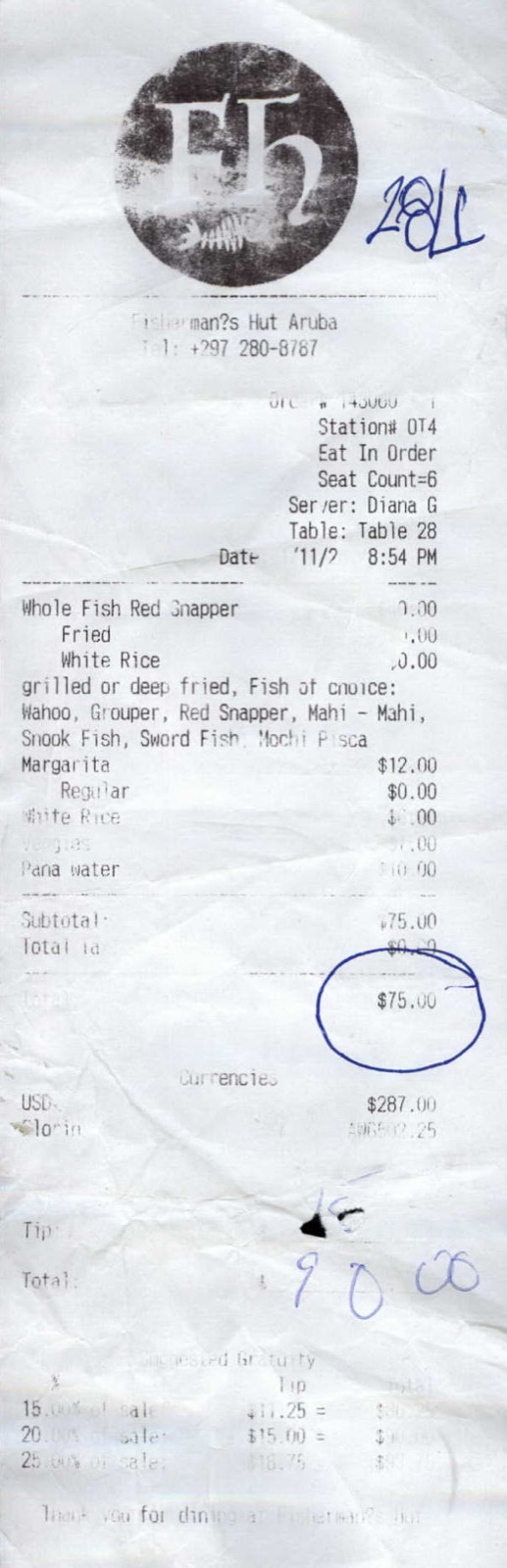 A restaurant receipt dated November 9, 2011, mailed to us in 2026. Crumpled, faded, and fourteen years late, and our software still read the vendor, the date, and the $90 total.
And if a receipt you need is already gone, faded or lost, our lost receipt guide shows how to rebuild the proof with statements and reprints.
What 293,272 receipts told us about storage timing
A lot of receipt storage advice is guesswork. Ours comes from a scanning queue, so let me show the work. We looked at every receipt our customers stored from March through May 2026 and kept the 293,272 with a readable purchase date, sent in by 3,524 businesses. Then we measured the gap between the date printed on each receipt and the day it entered storage. The medians below mark the middle receipt in each group, meaning half came in faster and half slower.
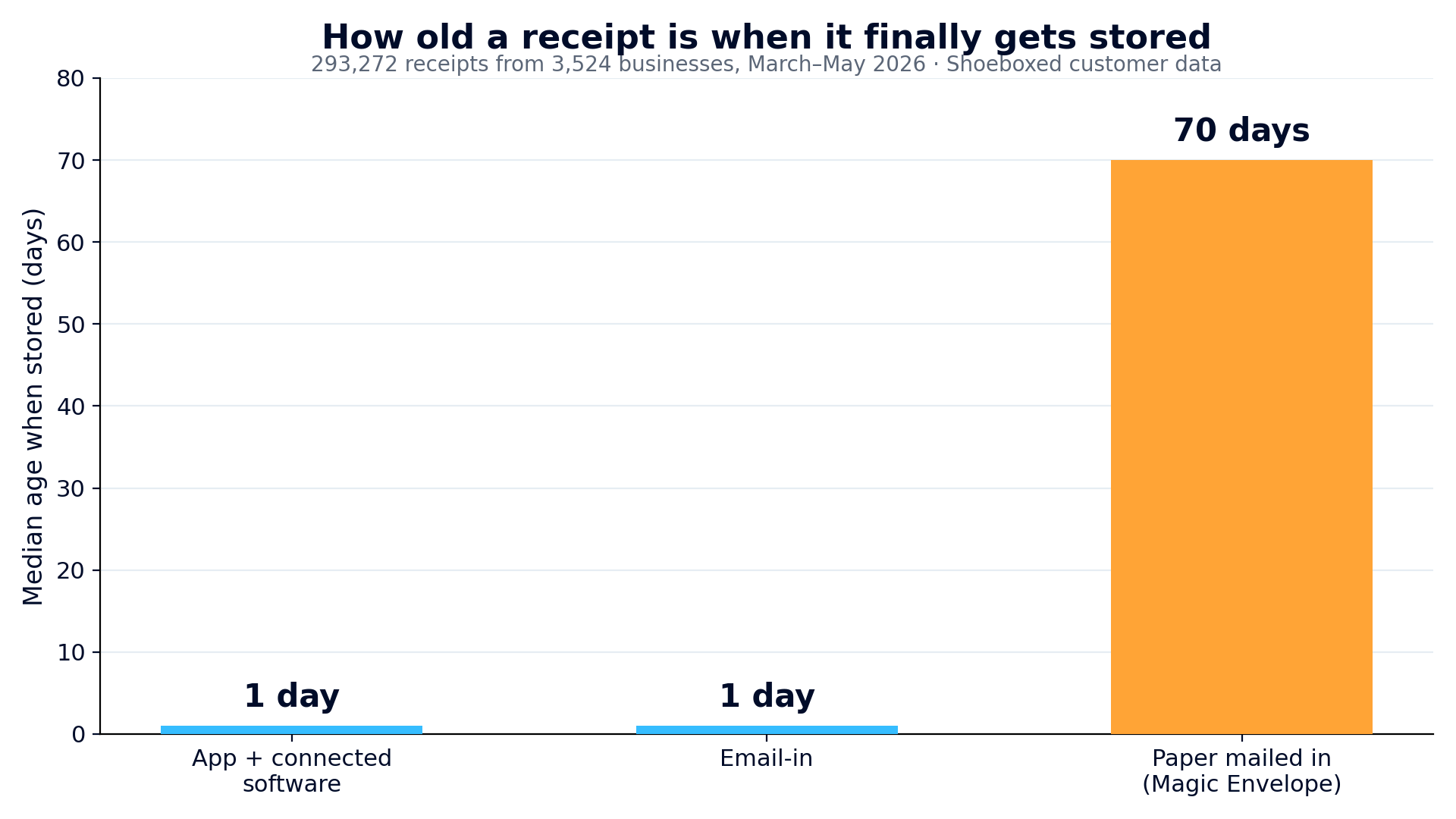 Median age of a receipt when it gets stored, by capture channel. Shoeboxed customer data, March to May 2026, 293,272 receipts from 3,524 businesses. How the receipt arrived Median age of a receipt when it gets stored, by capture channel. Shoeboxed customer data, March to May 2026, 293,272 receipts from 3,524 businesses. How the receipt arrived |
Median age when stored | Sat over 30 days | Sat over 90 days |
|---|---|---|---|
| App and connected software (135,280 receipts) | 1 day | 25% | 19% |
| Forwarded by email (51,061 receipts) | 1 day | 27% | 24% |
| Paper mailed in (106,805 receipts) | 70 days | 77% | 43% |
| The percentages in each row are out of that row's own receipts, and a handful of receipts arrived other ways, in numbers too small to report. Spring covers tax season, when people clean out backlogs, so the paper numbers may run a little old. |
The lesson isn't that paper is bad. The lesson is that paper tends to wait, and waiting is the risk. Snapping a photo or forwarding the email turns storage into something that happens the day you get the receipt instead of a chore that piles up.
The same data answers the keeping question too. Every receipt in our January 2024 storage check is still stored and retrievable today, almost two and a half years later, alongside the roughly 3.4 million receipts customers have sent since. Storage only counts if it still has the receipt when the IRS letter shows up.
One home for every receipt: how I would set it up
If I were starting from a kitchen-table shoebox today, here is the setup.
- Snap new paper receipts with the Shoeboxed app while you're still in the parking lot.
- Forward email confirmations to the personal email-in address that comes with your account. Or connect your Gmail, and Shoeboxed finds the receipt emails sitting in your inbox.
- Upload the PDF receipts already saved on your computer.
- Mail the backlog in a Magic Envelope , and do the same with any month's pile you don't feel like snapping.
From there our software pulls the vendor, date, and total off every image. The whole archive becomes searchable for the day your accountant asks for the receipts.
On the web, Shoeboxed starts at $9 a month with a 30-day money-back guarantee: try it for a month, and if it isn't for you, we refund the money. Start a Shoeboxed account → Rather start from your phone? The mobile app comes with a 7-day free trial, no payment required up front:


Stored receipts also back up deductions you might be leaving on the table. If you work from home, our free home office calculator shows what your space could be worth on a Schedule C.
Helping you keep more of your hard-earned money is the whole point.
Frequently asked questions about storing receipts
How long does the IRS require me to keep receipts?
Keep records for three years in the normal case. The window stretches to six years if you left more than 25% of your income off a return, and to seven years for worthless securities or bad debt claims. Employment tax records need at least four years. Keep receipts for property until the IRS audit window ends after you dispose of it, and keep everything if you never filed a return.
Does the IRS accept photos or scans of receipts?
Yes. The IRS says "all requirements that apply to hard copy books and records also apply to electronic records." Publication 583 accepts any electronic storage system that gives a complete, accurate record you can produce when asked. The image needs to show the payee, the amount you paid, proof that you paid it, the date, and what you bought.
What is the best way to store receipts for taxes?
Capture a digital copy within a week of the purchase and keep every receipt in one searchable place for at least three years. The capture deadline matters more than the container, because most paper receipts go blank long before three years are up. Store each one with the vendor, date, and amount attached as searchable details. Three years from now you want to be looking at the receipt, not looking for it. In our spring 2026 data, receipts captured by app or email were stored at a median of 1 day old. Mailed paper had sat a median of 70 days.
What should I do with a shoebox of old, faded receipts?
Scan it now, starting with the oldest receipts, because the print keeps fading while you wait. You're in good company: one in ten receipts we received this spring was over a year old. Once everything is digital, apply the IRS retention windows and shred the paper that falls outside them.
Are the rules different for business and personal receipts?
Yes, the purpose is different even though the habit is the same. The IRS retention windows apply to receipts that back up a tax return, which for most people means business receipts. Personal receipts mainly matter for store refunds, warranties, and insurance claims. Keep each one until that protection runs out, and keep proof of ownership on big-ticket items longer. The same capture habit covers both piles. Our guide to the types of receipts sorts out which is which.
About the author
I'm Doug. I bought Shoeboxed in late 2025 with an SBA loan and 5% down, so I run a small business and sweat the same tax bill you do. The receipt numbers in this article come straight from our own scanning operation in Durham. I write these guides because the surest way to grow Shoeboxed is to help people keep more of what they earn.
Sources
30 Seconds Could Save You Thousands on Taxes
Self-employed? Get an instant, personalized tax-savings estimate.




 4.4 / 5 on